Getting Started with SaturnSQL
Welcome to SaturnSQL. This guide will help you set up your account and start querying your databases in minutes.
1. Create your account
Sign up for SaturnSQL using your email or Google account. After verification, you'll have immediate access to your personal workspace where you can connect databases and start writing queries.
2. Connect your database
Navigate to Settings and add a new database connection. You'll need your connection details: host, port, database name, username, and password. SaturnSQL supports SSL connections for secure data transfer.
3. Write your first query
Open a new query tab, select your connected database, and start writing SQL. The editor provides autocomplete suggestions based on your schema, making it easy to explore tables and columns you're not yet familiar with.
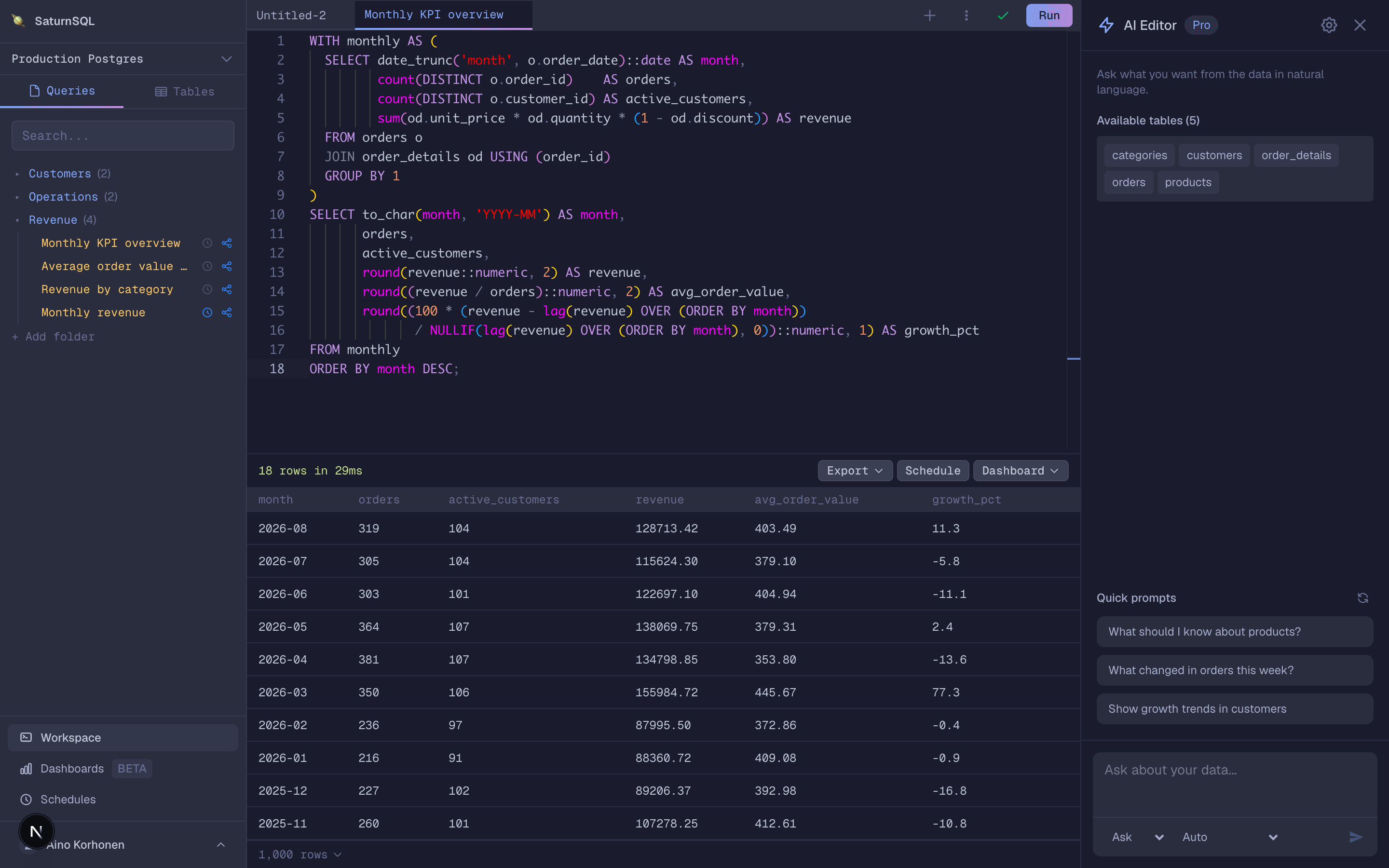
4. Save and organize
Save queries you want to keep for later. Give them descriptive names so you and your teammates can find them quickly. Saved queries form a shared library of knowledge about your data.
Further reading
- Connecting a database — supported databases and secure connection setup
- AI SQL assistant — draft, explain, and optimize queries with AI inside the editor
- Using SaturnSQL with AI coding agents — connect Claude, ChatGPT, Cursor, or any other MCP client
- Scheduling queries — run queries automatically and export to Google Sheets
- Inviting team members — share your query library with the team
