The Best SQL Clients in 2026 (Free and Paid)
Six SQL clients ranked on price, platform support and whether they work for a team, with the weaknesses stated plainly.
- Free for 14 days, no credit card
- Desktop app for Mac and Linux
- Rated 5.0 on G2 (2 reviews)
Updated 20 September 2026. Prices checked 8 August 2026 against each vendor’s own pricing page.
- DBeaverFree / $113/yr
Free universal client, connects to almost anything
- TablePlus$99 once
Best native feel, one-time licence
- Beekeeper StudioFree / $9/mo
Cleanest open-source desktop client
- HeidiSQLFree
Best free client on Windows
- psql and friendsFree
For people who live in the terminal
- Try SaturnSQL freeSaturnSQL€19/user/mo
Browser-based, for teams that share and schedule queries
What counts as a SQL client
A SQL client is the tool you open to connect to a database, browse its tables, and run queries. That is a deliberately narrow job — this post is about clients, not the heavyweight database IDEs with refactoring engines and diagram designers (we rank those separately in our best SQL IDE guide). For the connect-browse-query job, the best tool depends on your OS, your databases, and whether you work alone or with a team. Here are the six worth knowing in 2026, ranked, with honest weaknesses included.
1. DBeaver — best free universal client
DBeaver is the default answer to "what SQL client should I install?" for a reason: the Community Edition is free and open source, it runs on macOS, Windows, and Linux, and it connects to a wider range of databases than anything else on this list — mainstream engines, niche ones, and legacy systems alike. Beyond querying, it packs in administration features: user management, data import and export, ER diagrams.
Weaknesses: it is Java-based and can feel heavy and cluttered, especially if all you want is to run a query and look at rows. It is also strictly single-user: every teammate installs and updates it separately, and there is no shared query library or scheduling. If those are your pain points, see our DBeaver alternatives roundup.
Pricing (as of mid-2026): Community Edition is free and open source. Paid PRO editions add drivers and features on a subscription. Best for: anyone who needs one free tool that talks to many different databases.
2. TablePlus — best native feel, one-time license
TablePlus is what people switch to when DBeaver feels sluggish. It is a fast native GUI with a clean, minimal interface, available on macOS, Windows, and Linux, and it supports a broad set of databases. Browsing tables, editing rows inline, and running ad-hoc queries all feel immediate. It is a particular favorite on macOS, where it feels genuinely at home — if that is your platform, our SQL client for Mac guide goes deeper.
Weaknesses: the free tier limits how many tabs and connections you can have open, so real daily use means buying a license. Like DBeaver, it is single-user, with no shared library or scheduling, and it has fewer administration features than DBeaver.
Pricing (as of mid-2026): limited free tier; a paid license is a one-time purchase per device rather than a subscription. Best for: solo developers who want the snappiest native desktop experience and dislike subscriptions.
3. Beekeeper Studio — cleanest open-source client
Beekeeper Studio is a modern, open-source, cross-platform SQL client with the most polished, uncluttered UI of the free options. It supports MySQL, PostgreSQL, SQLite, SQL Server, and more, and everything stays on your machine — a genuine plus if privacy or air-gapped work matters to you. If you like that DBeaver is free but not that it is heavy, Beekeeper is the natural pick.
Weaknesses: database support is narrower than DBeaver’s, some features are reserved for the paid edition, and it shares the desktop-client limitation of the tools above: local-first means nothing is shared with your team.
Pricing (as of mid-2026): free open-source Community Edition; a paid edition unlocks extra features on an inexpensive subscription. Best for: people who want a free, good-looking, local-first client for mainstream databases.
4. HeidiSQL — best free client on Windows
HeidiSQL is a long-standing free and open-source Windows client focused on MySQL, MariaDB, PostgreSQL, and SQL Server. It is lightweight, fast, and beloved by Windows developers who find DBeaver more tool than they need. For quickly poking at a MySQL database on a Windows machine, it is hard to beat at the price of free.
Weaknesses: it is Windows-first. Native Linux builds only arrived in 2025, and the macOS build (late 2025) runs only on Apple Silicon and has no SQL Server support. The interface shows its age next to TablePlus or Beekeeper.
Pricing (as of mid-2026): free and open source. Best for: Windows users on MySQL, MariaDB, PostgreSQL, or SQL Server who want a no-cost, no-fuss client.
5. psql and other CLI clients — best for terminal people
Every major database ships a command-line client — psql for PostgreSQL, mysql for MySQL, sqlcmd for SQL Server — and for many developers that is all the client they ever need. They are free, already installed on most servers, scriptable, and work over SSH where no GUI can follow. Enhanced CLIs like pgcli and mycli add autocomplete and syntax highlighting on top.
Weaknesses: wide result sets are painful to read in a terminal, there is no point-and-click schema browsing, and sharing results means copy-pasting. CLIs are a power tool for people who already know their schema, not a way for a broader team to explore data.
Pricing (as of mid-2026): free, bundled with the database. Best for: developers and DBAs who live in the terminal and script their workflows.
6. SaturnSQL — best browser-based client for teams
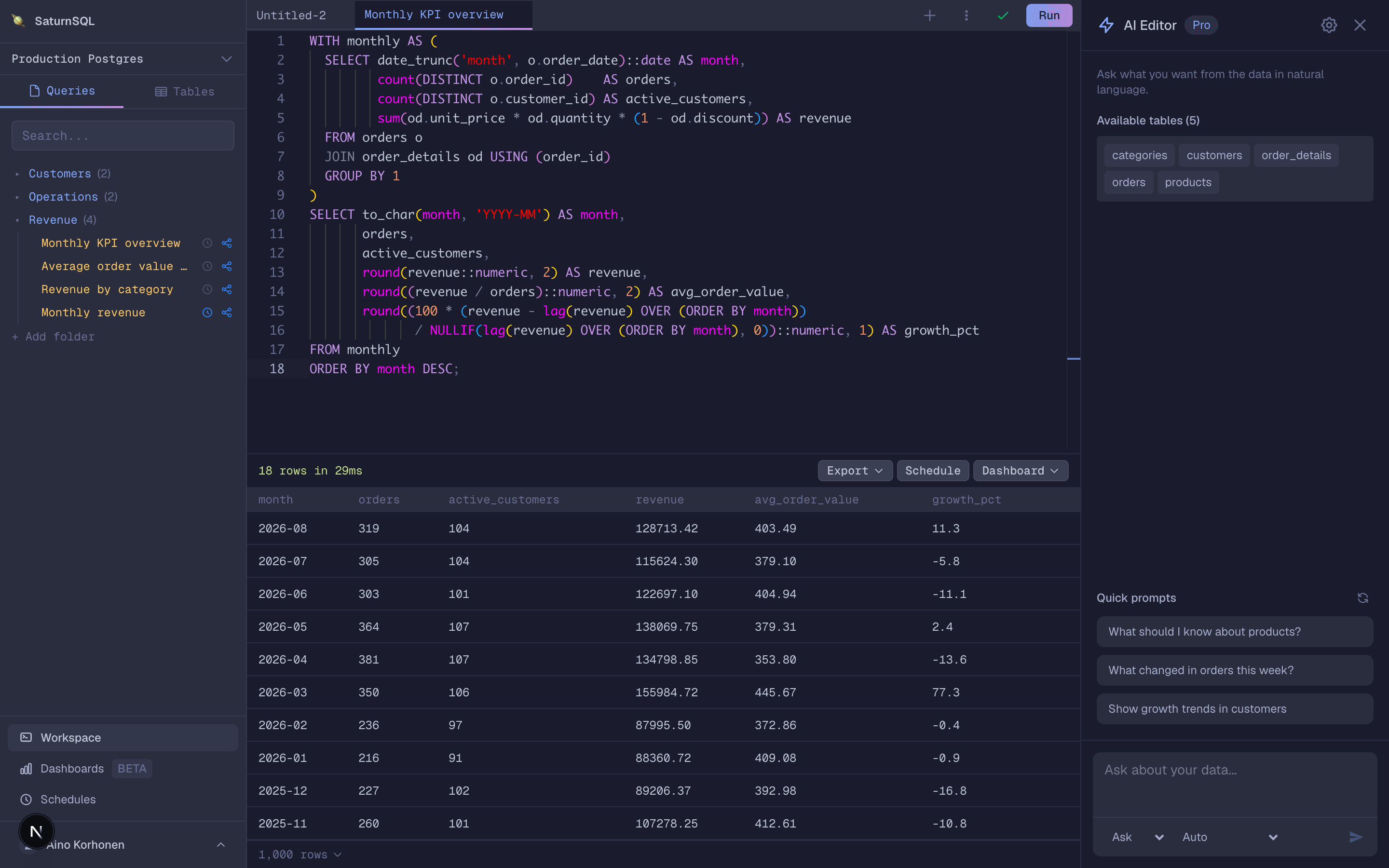
SaturnSQL is not trying to replace the desktop clients above for solo work. It is a SQL client that runs entirely in the browser, which changes what it is good at. There is nothing to install or update, queries live in a shared library the whole team can see instead of in one person’s app, and recurring questions become scheduled queries that push results to Google Sheets automatically. It supports PostgreSQL, MySQL/MariaDB, Microsoft SQL Server, Oracle, Amazon Redshift, ClickHouse, BigQuery, and DynamoDB, with schema-aware autocomplete and an AI assistant for writing SQL against your live schema. If you would rather ask Claude, ChatGPT or Cursor, the hosted MCP server connects them to the same databases.
Weaknesses: it is not a database administration console — no user management, index tuning, or dump-file imports, so keep a desktop tool for that. Database support is narrower than DBeaver’s, and if you work strictly solo and never share a query, a native client will serve you just as well.
Pricing (as of mid-2026): free tier available; paid plans start from €19/month per user. Best for: teams that share queries, schedule reports, and do not want to manage installs.
Free vs paid: what you actually give up
The free options here are genuinely good — DBeaver, Beekeeper, HeidiSQL, and the CLIs cover the core job of connecting and querying without asking for a card. What paid tools buy you tends to fall into three buckets:
- Polish and speed. TablePlus’s license mostly buys a nicer, faster daily experience than the free universal tools.
- Breadth. Paid editions of DBeaver and Beekeeper unlock extra drivers, formats, and conveniences the free editions hold back.
- Collaboration. No free desktop client gives you a shared query library, scheduling, or results that flow to the tools your stakeholders use. That is the gap browser-based team tools charge for — and it is a per-team cost, not a per-hobbyist one.
If you are a solo developer, staying free is a perfectly sound long-term plan. The moment paying starts to make sense is usually when a second person asks "can you send me that query?" for the third time.
How to choose: a short buying guide
- Start with your OS. On Windows, HeidiSQL is a strong free default. On macOS, TablePlus feels most native. On Linux, DBeaver and Beekeeper are the safest bets. If you hop between machines, a browser-based client sidesteps the question entirely.
- Then your databases. One niche or legacy engine in the mix usually decides it for DBeaver. All-mainstream stacks (Postgres, MySQL, SQL Server) are served by everything on this list.
- Solo or team? Solo: pick the desktop client that feels best in your hands. Team: the client matters less than where the queries live — a shared, browser-based workspace beats six separate installs with six private query stashes.
- Check your install policy. On locked-down corporate machines where you cannot install software, a browser-based client or the CLI already on the server may be the only options that work today.
- Client or IDE? If you spend your day writing and refactoring large SQL codebases rather than querying, you may want a full IDE instead — see our best SQL IDE ranking.
And whichever client you pick, connect it with a read-only user for analysis work, and if SQL itself is the bottleneck, our free SQL learning resources will get you writing queries faster than any tool switch.
Frequently asked questions
What is the best free SQL client?
DBeaver Community Edition is the best free SQL client for most people: open source, cross-platform, and able to connect to almost any database. Beekeeper Studio is a lighter open-source option with a cleaner interface, and HeidiSQL is a great free choice on Windows. If your team needs to share and schedule queries, SaturnSQL has a free tier that runs in the browser.
What SQL client works on any OS?
DBeaver, TablePlus, and Beekeeper Studio all ship desktop apps for macOS, Windows, and Linux, and CLI clients like psql run anywhere you have a terminal. A browser-based client is the most OS-independent option of all — it runs in any modern browser with nothing to install, including on machines where you cannot install software.
Do I need a desktop SQL client?
Not necessarily. A desktop client makes sense if you work solo, need administration features, or prefer a native app. If your work is mostly querying, reporting, and sharing results with a team, a browser-based client covers it with no installs to manage — and terminal tools like psql are enough for many developers.
Try the browser-based option free for 14 days
