The Best SQL IDEs in 2026 (Honest Rankings)
Six SQL IDEs ranked on code intelligence, engine coverage, licence terms and team use, each with who it is wrong for.
- Free for 14 days, no credit card
- Desktop app for Mac and Linux
- Rated 5.0 on G2 (2 reviews)
Updated 3 October 2026. Prices checked 8 August 2026 against each vendor’s own pricing page.
- DataGripFree non-comm. / €259/yr
The most polished SQL IDE, free for non-commercial use
- DBeaverFree / $113/yr
Best free universal IDE
The standard for SQL Server, Windows only
- MySQL WorkbenchFree
The free official IDE if you live in MySQL
Good enough SQL inside the editor you already use
- Try SaturnSQL freeSaturnSQL€19/user/mo
Browser-based, for teams that share and schedule queries
What counts as a SQL IDE
A SQL IDE (integrated development environment) is an application for writing, running and maintaining SQL against a live database. On top of a text editor it adds schema-aware autocomplete, an object browser, a results grid, query plans, refactoring and version control. That is a different tool from a lightweight client you open to browse a table and run a quick SELECT (we rank those separately in our best SQL client guide). If SQL is a serious part of your day, here are the six IDEs worth considering in 2026, ranked with their trade-offs stated plainly.
| Tool type | What it does | Examples |
|---|---|---|
| SQL editor | Syntax highlighting for .sql files, no database connection of its own | Any code editor without extensions |
| SQL client | Connects to a database, browses tables, runs queries | TablePlus, Beekeeper Studio, psql |
| SQL IDE | A client plus refactoring, query plans, schema tools and version control | DataGrip, DBeaver, SSMS, MySQL Workbench |
There is no single best IDE for SQL, and anyone who tells you otherwise is selling something. The right answer depends on which databases you connect to, whether your licence has to cover commercial work, and whether you are working alone or sharing queries with a team. Each entry below says plainly who it is wrong for.
1. DataGrip: the most polished SQL IDE
DataGrip by JetBrains is what most people mean when they say "SQL IDE". It brings IntelliJ-grade code intelligence to SQL: context-aware autocomplete that understands your schema, cross-file refactoring (rename a column and it updates every query that references it), inline query plans, diffing, and version control integration. It supports a very wide range of databases, and if you already use other JetBrains IDEs the muscle memory carries over completely.
- Strengths: the deepest SQL code intelligence of any tool here, excellent refactoring and schema navigation, broad database support, first-class git integration.
- Weaknesses: the free licence covers non-commercial use only, so companies pay per seat, and it is a heavyweight app that takes real memory. Single-user too (no shared query library or scheduling), and it can feel like overkill if you mostly run ad-hoc queries.
Pricing: free for non-commercial use since October 2025 (learning, hobby projects, open source), renewed annually. Organisations pay €259 per user per year, verified 3 August 2026. Best for: developers and analysts who write SQL across multiple databases every day. See our DataGrip vs DBeaver comparison and our DataGrip alternatives roundup.
2. DBeaver: the best free universal IDE
DBeaver Community Edition is free, open source, and connects to nearly every database you can name: PostgreSQL, MySQL, SQL Server, Oracle, Snowflake, BigQuery, MongoDB, and dozens more. Beyond the editor it packs genuine DBA features: ER diagrams, data import/export between connections, a session manager, query plan visualization, and mock data generation. For a free tool the depth is remarkable.
- Strengths: genuinely free forever, near-universal database support, strong admin and data-transfer tooling, works offline, cross-platform.
- Weaknesses: Java-based and can feel heavy and cluttered, autocomplete is a step behind DataGrip, single-user desktop app with no built-in sharing or scheduling, and every teammate installs and updates it separately.
Pricing: Community Edition is free and open source; paid editions add NoSQL and cloud sources, starting with Lite at $113 per year (verified August 2026). Best for: anyone who wants one free tool for many databases. If it feels like too much, see our DBeaver alternatives roundup.
3. SQL Server Management Studio: the SQL Server standard
SQL Server Management Studio (SSMS) is Microsoft’s free, official environment for SQL Server and Azure SQL, and on that stack it is simply the standard. Nothing else matches its coverage of SQL Server internals: execution plans, index and security management, SQL Server Agent jobs, backups, profiling. If you administer SQL Server for a living, SSMS is not really optional.
- Strengths: free, the deepest SQL Server tooling anywhere, first-party support from Microsoft, trusted in every enterprise Windows shop.
- Weaknesses: Windows only, SQL Server only, and the editor itself (autocomplete, refactoring) lags modern IDEs. Mac and Linux users need a different tool entirely.
Pricing: free. Best for: DBAs and developers whose world is Microsoft SQL Server on Windows.
4. MySQL Workbench: the official MySQL IDE
MySQL Workbench is Oracle’s free, official tool for MySQL, and it goes well beyond a query editor: visual schema design with forward and reverse engineering, ER modeling, server configuration, user administration, and migration tooling. If your work is MySQL end to end, it covers the whole lifecycle from designing a schema to tuning the server.
- Strengths: free and official, excellent visual schema/ER design, solid admin and migration features, cross-platform.
- Weaknesses: MySQL (and MariaDB, partially) only, the interface feels dated, stability has a mixed reputation on some platforms, and there is no collaboration story at all.
Pricing: free (Community Edition, GPL). Best for: developers and DBAs working exclusively with MySQL who want the official toolchain.
5. VS Code + SQL extensions: SQL where you already live
If VS Code is already your editor, extensions like MSSQL, SQLTools, and various PostgreSQL/MySQL extensions turn it into a workable SQL IDE: connect, autocomplete, run queries, view results, all without leaving the window where your application code lives. SQL files sit in the same repo, the same git workflow, the same keybindings. For developers who touch SQL as part of building an app, that integration is the whole point.
- Strengths: free, zero context switching for developers, SQL lives next to application code in version control, huge extension ecosystem.
- Weaknesses: the experience is assembled from parts and varies by extension and database, schema intelligence is shallower than a dedicated IDE, and results grids, ER tools, and admin features are limited.
Pricing: free (VS Code and the mainstream SQL extensions). Best for: developers who write some SQL inside a codebase and do not want a second application open.
6. SaturnSQL: the browser-based IDE for teams
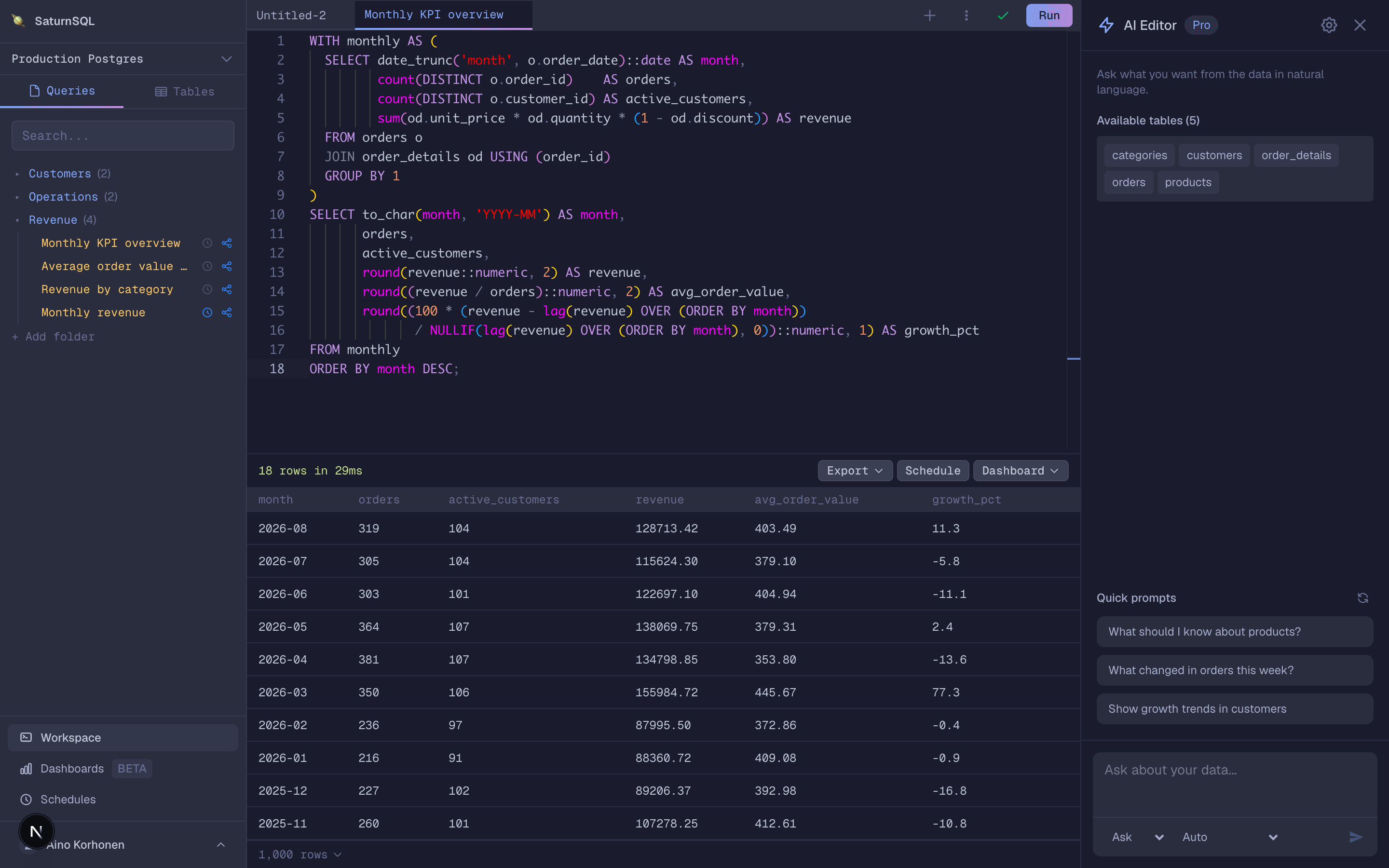
SaturnSQL is our own product, so read this entry with that in mind. It is not trying to out-IDE DataGrip: there is no local refactoring engine, no ER diagrams, no DBA console. What it does differently is run entirely in the browser and treat the team as the user. Queries live in a shared library everyone can see, credentials are managed centrally, results go to Google Sheets or Slack on a schedule, and an AI assistant drafts and debugs SQL against your live schema. A hosted MCP server also lets Claude, ChatGPT or Cursor query your databases. It supports PostgreSQL, MySQL/MariaDB, SQL Server, Oracle, Amazon Redshift, ClickHouse, BigQuery, and DynamoDB. (How centrally managed credentials work in practice: database access management without shared passwords.)
- Strengths: nothing to install or update, shared query library and role-based access, scheduled queries delivered to Google Sheets or Slack, same experience on every machine.
- Weaknesses: no offline mode, a focused set of supported databases rather than dozens, and no database administration features. Solo power users are better served by DataGrip or DBeaver.
Pricing: free tier available; paid plans from €19/month per user (as of mid-2026). Best for: teams that share, review, and schedule queries together and want a workspace instead of six separate desktop installs.
How to choose a SQL IDE
The rankings above are one opinion. The right answer for you comes down to four questions:
- Solo or team? Every desktop IDE on this list is single-user: your queries live on your machine, and sharing means pasting SQL into Slack. If the same queries are run by several people, a shared workspace like SaturnSQL saves more time than any autocomplete feature. Working alone, the desktop tools win on depth.
- One database or many? All-in on one engine, take the official tool: SSMS for SQL Server, MySQL Workbench for MySQL, pgAdmin for PostgreSQL. Hopping between engines, you want a universal tool: DataGrip if you will pay, DBeaver if you will not.
- Desktop or browser? Desktop gives you offline work, local data, and deeper OS integration. Browser gives you zero installs, instant onboarding, and identical setups for everyone. Compliance rules can decide this for you in either direction.
- What is the budget? Honestly, you can get very far on free software: DBeaver, SSMS, MySQL Workbench, and VS Code cost nothing. Pay when a specific gap hurts: DataGrip for editor polish, or a team plan when query sharing and scheduling become the bottleneck.
If you are still building SQL fundamentals, the tool matters less than the practice: our free SQL learning hub covers the essentials, and any IDE on this list will serve you while you learn. And if what you actually need is a lightweight tool for quick queries rather than a full environment, start with the best SQL client guide instead.
Frequently asked questions
What is a SQL IDE?
A SQL IDE (integrated development environment) is an application for writing, running and maintaining SQL against a live database. Beyond a text editor it adds schema-aware autocomplete, an object browser, query execution with a results grid, query plans, refactoring, and version control. DataGrip, DBeaver, SQL Server Management Studio, MySQL Workbench and VS Code with SQL extensions are the most common ones.
What is the difference between a SQL IDE and a SQL client?
A SQL client connects to a database so you can browse tables and run queries. A SQL IDE does that too, and adds development features: refactoring across files, query plans, schema diffing, debugging and version control. Every IDE is a client, but a lightweight client like TablePlus or psql is not a full IDE. Our best SQL client guide covers the lighter tools.
Which SQL IDE works on Mac and Linux?
DataGrip, DBeaver, MySQL Workbench and VS Code run on macOS, Linux and Windows. SQL Server Management Studio is Windows only, so Mac users working with SQL Server use VS Code with the MSSQL extension, DataGrip or DBeaver instead. Browser-based tools such as SaturnSQL work on any operating system. See also our SQL clients for Mac comparison.
What is the best free SQL IDE?
DBeaver Community Edition is the best free SQL IDE for most people: it is open source, connects to nearly every database, and is free for commercial work too. DataGrip is free for non-commercial use, so for learning, hobby projects and open source it is arguably the best free option of all. If you work with a single engine, the free official tools are excellent too, SSMS for SQL Server and MySQL Workbench for MySQL. VS Code with SQL extensions is also free if you already use it.
Is DataGrip worth it?
If you write SQL against multiple databases every day, usually yes. Its code intelligence, refactoring, and schema navigation are the most polished of any SQL IDE, and it comes with the JetBrains All Products Pack many developers already have. If you query occasionally, or a free tool like DBeaver already covers your needs, the subscription is harder to justify.
What SQL IDE works in the browser?
SaturnSQL runs entirely in the browser, so there is nothing to install or update. It connects to PostgreSQL, MySQL/MariaDB, SQL Server, Oracle, Amazon Redshift, ClickHouse, BigQuery, and DynamoDB, with schema-aware autocomplete, a shared team query library, scheduled queries, and delivery to Google Sheets and Slack.
Want the team option? Try SaturnSQL free
