SQL Client for Mac: The Best Options in 2026
Five SQL clients for macOS compared on install, engine support, team features and price, from native apps to a browser tab.
- Free for 14 days, no credit card
- Desktop app for Mac and Linux
- Rated 5.0 on G2 (2 reviews)
Updated 20 September 2026. Prices checked 8 August 2026 against each vendor’s own pricing page.
- Try SaturnSQL freeSaturnSQL€19/user/mo
Browser-based, nothing to install, shared with the team
- TablePlus$99 once
The native Mac app, with a one-time licence
- DBeaverFree / $113/yr
Free and connects to almost anything
- Beekeeper StudioFree / $9/mo
Clean open-source desktop client
- Sequel AceFree
Free, for MySQL and MariaDB only
Comparison: SQL clients for Mac at a glance
| SaturnSQL | TablePlus | DBeaver | Beekeeper | Sequel Ace | |
|---|---|---|---|---|---|
| App type | Browser | Native | Java | Electron | Native |
| Databases | 8 engines | Many | Very many | Several | MySQL only |
| No install (works in browser) | ✓ | — | — | — | — |
| Free tier | ✓ | ✓ | ✓ | ✓ | ✓ |
| Shared query library | ✓ | — | — | — | — |
| Scheduled queries | ✓ | — | — | — | — |
| Export to Google Sheets | ✓ | — | — | — | — |
| Role-based team access | ✓ | — | — | — | — |
| DB administration features | — | — | ✓ | — | ✓ |
| Price (mid-2026) | Free / €19/mo | $99 once | Free / $113/yr | Free / $9/mo | Free |
SaturnSQL — the browser-based option
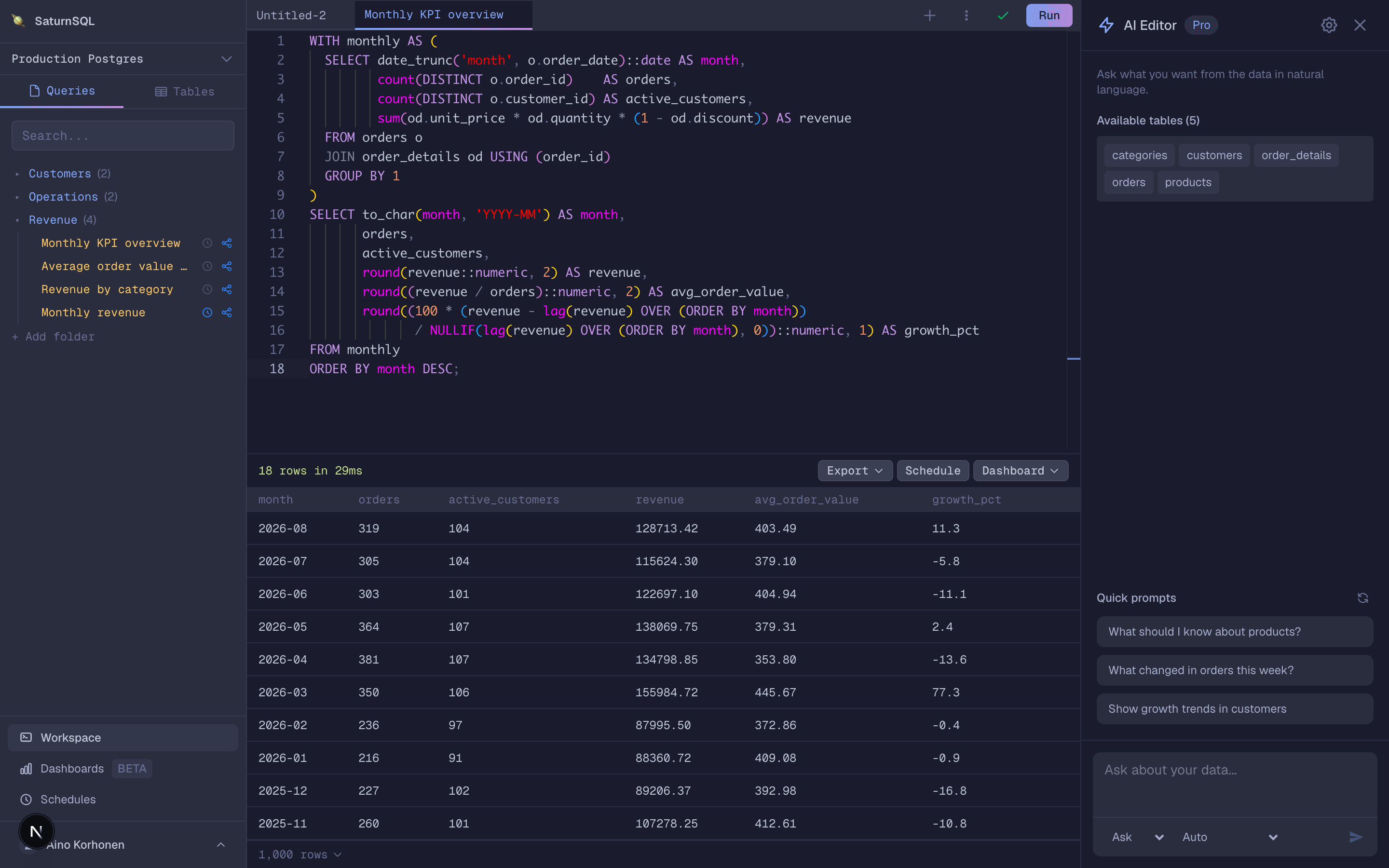
SaturnSQL takes a different angle from every other tool on this list: it runs entirely in your browser. On a Mac that means no .dmg to download, no app to keep updated, no Rosetta or Apple Silicon questions — Safari, Chrome, or Arc is all you need, and the tool is identical whether you are on a 2019 Intel MacBook or a new M-series machine. It is built for teams: queries live in a shared library instead of one person’s laptop, connections are shared behind role-based access, and you can schedule a query to push results to Google Sheets on a cron. If you already use Claude, ChatGPT or Cursor on your Mac, the hosted MCP server lets them query the same connections.
- ✓ Nothing to install — works in any modern browser on any Mac
- ✓ Shared query library that survives laptop swaps and offboarding
- ✓ Scheduled exports to Google Sheets, plus CSV and Excel
- ✓ Schema-aware autocomplete for tables, columns, and joins
- ✓ Encrypted credentials at rest and TLS connections
Honest scope note: SaturnSQL supports PostgreSQL, MySQL, MariaDB, SQL Server, Oracle, Amazon Redshift, ClickHouse, BigQuery, and DynamoDB. Snowflake is only on the Pro plan, and it is not a database administration console — for index tuning or user management, keep a desktop tool around. It is built for the day-to-day querying, reporting, and sharing a team does together.
Pricing: Free tier available. Paid plans from €19/user/month as of mid-2026.
TablePlus — the native Mac favorite
TablePlus began life as a macOS app and it shows: it is fast, genuinely native, and follows Mac conventions for shortcuts and windowing. It supports a wide spread of databases — PostgreSQL, MySQL, SQL Server, SQLite, Redis, and more — and is excellent for browsing tables, editing rows inline, and quick ad-hoc queries. If you want the best native feel on a Mac, this is it.
The trade-offs: it is a single-user tool with no shared query library or scheduling, the free tier is limited (a couple of tabs and connections at a time), and each teammate needs their own license and their own local setup. As of mid-2026 a license starts at $99 one-time, which many Mac developers consider well worth it for solo work.
DBeaver — free and universal, but Java
DBeaver Community Edition is free, open source, and connects to practically everything — including niche and legacy engines no one else bothers with. It also packs real administration features: ER diagrams, data transfer, dump imports. If your work spans many database types and you want one free tool for all of them, DBeaver is hard to argue with.
On a Mac, the catch is that it is a Java/Eclipse-based app: it does not feel native, it is memory-hungry, and startup is slow compared to TablePlus or a browser tab. It is also single-user, with no team library or scheduling. The Community Edition is free; Pro starts around $25/month as of mid-2026. We compare it in depth in our DBeaver alternatives roundup.
Beekeeper Studio — clean and open source
Beekeeper Studio is an open-source, Electron-based client with one of the cleanest interfaces in the category. It supports PostgreSQL, MySQL, SQLite, SQL Server, and more, and it is local-first: everything stays on your machine, which privacy-minded developers appreciate. It runs fine on both Intel and Apple Silicon Macs.
Being Electron rather than native, it is lighter than DBeaver but not as snappy as TablePlus, and like every desktop client here it is single-user with no scheduling. The Community Edition is free; the Ultimate edition starts around $7/month as of mid-2026, one of the cheapest paid upgrades on this list.
Sequel Ace — free and native, MySQL only
Sequel Ace is the community-maintained successor to the much-loved Sequel Pro. It is free, open source, fully native to macOS (it is in the Mac App Store), and fast. For MySQL and MariaDB work on a Mac it remains a favorite, with a straightforward query editor and good table structure editing.
The limitation is right there in the lineage: it speaks MySQL and MariaDB only. No PostgreSQL, no SQL Server, no warehouses. If your world is a single MySQL database, it is a great zero-cost choice; the moment you need a second engine you will be running a second tool. See our MySQL editor page for the browser-based take on the same job.
Why a browser-based SQL client makes sense on a Mac
The native-versus-browser question used to be about performance. For a SQL editor, it no longer is: the heavy work happens on the database server, and a modern browser editor with schema-aware autocomplete feels as fast as a desktop app. What the browser changes is everything around the editor. There is no install and no updates — you always have the latest version. The tool is identical on your Mac, your teammate’s Windows laptop, and the Linux box in the office. Your query library follows your login rather than your hardware, so a laptop upgrade or a new hire is a non-event. And because the workspace is shared, features that make no sense in a desktop app become possible: a team query library, role-based access to connections, and scheduled exports that land results in a Google Sheet every morning.
That is the lane SaturnSQL is built for. If you mostly query PostgreSQL, MySQL, SQL Server, Oracle, Redshift, ClickHouse, or DynamoDB — and especially if more than one person does — a browser tab beats five separate desktop installs.
Which SQL client should you pick on a Mac?
Pick TablePlus if you work solo and want the best native Mac experience. Pick DBeaver if you need free and universal, and can live with Java. Pick Beekeeper Studio for a clean open-source local-first client. Pick Sequel Ace if MySQL or MariaDB is all you touch. Pick SaturnSQL if you want nothing to install, a query library your whole team shares, and results landing in Google Sheets on a schedule. Already on a Mac-only client and outgrowing it? See Postico alternatives and HeidiSQL alternatives.
Frequently asked questions
What is the best free SQL client for Mac?
DBeaver Community Edition and Beekeeper Studio’s Community Edition are free, open-source desktop clients that run well on macOS. Sequel Ace is free and native but only speaks MySQL and MariaDB. SaturnSQL has a free tier and runs in the browser, so there is nothing to install at all.
Does TablePlus work on Mac?
Yes. TablePlus started as a macOS app and is still at its best there: a fast, native GUI supporting PostgreSQL, MySQL, SQL Server, SQLite, Redis, and more. There is a free tier with limited tabs and connections, and a one-time license from $99 as of mid-2026.
Is there a SQL client for Mac that needs no install?
Yes. SaturnSQL runs entirely in the browser: open a tab, connect, and query. No download, no updates, and it works identically on an Intel MacBook, an Apple Silicon Mac, and any Windows or Linux machine your teammates use. It supports PostgreSQL, MySQL/MariaDB, SQL Server, Oracle, Amazon Redshift, ClickHouse, and DynamoDB.
Which Mac SQL client is best for teams?
Desktop clients like TablePlus, DBeaver, and Sequel Ace are single-user tools: queries and connections live on one laptop. For a team, SaturnSQL’s browser-based workspace adds a shared query library, role-based access, and scheduled exports to Google Sheets, with nothing for anyone to install.
Query your database from any Mac, no install required
