6 Best HeidiSQL Alternatives in 2026
Six HeidiSQL alternatives compared on platforms, engines, credential storage and team features, with verified prices and two picks that are free.
- Free for 14 days, no credit card
- Desktop app for Mac and Linux
- Rated 5.0 on G2 (2 reviews)
Updated 17 October 2026. Prices checked 17 October 2026 against each vendor’s own pricing page.
- Try SaturnSQL freeSaturnSQL€19/user/mo
Teams that share queries, or anyone who needs reports to run without them
- DBeaverFree / $113/yr
A free client that is mature on every platform
- Beekeeper StudioFree / $9/mo
A modern interface on any desktop
- TablePlus$99 once
Paying once for a fast native app on every platform
- Sequel AceFree
A free MySQL client for Mac users, on Intel or Apple Silicon
- DataGripFree non-commercial / €259/yr
Developers who want a full database IDE
Feature comparison
| SaturnSQL | HeidiSQL | DBeaver | Beekeeper Studio | TablePlus | Sequel Ace | |
|---|---|---|---|---|---|---|
| Browser-based | ✓ | — | — | — | — | — |
| Runs on macOS* | ✓ | ~ | ✓ | ✓ | ✓ | ✓ |
| Runs on Linux | ✓ | ✓ | ✓ | ✓ | ✓ | — |
| Free* | ~ | ✓ | ✓ | ~ | ~ | ✓ |
| Credentials kept off users’ machines | ✓ | — | — | — | — | — |
| Shared query library | ✓ Paid | — | — | ✓ Paid | — | — |
| Scheduled queries | ✓ Paid | — | — | — | — | — |
| Export to Google Sheets | ✓ Paid | — | — | — | — | — |
| MySQL / MariaDB | ✓ | ✓ | ✓ | ✓ | ✓ | ✓ |
| PostgreSQL | ✓ | ✓ | ✓ | ✓ | ✓ | — |
| SQL Server* | ✓ | ~ | ✓ | ✓ | ✓ | — |
| SQLite | — | ✓ | ✓ | ✓ | ✓ | — |
| Licence model | Subscription | Free / GPL | Free / sub | Free / sub | Perpetual | Free / MIT |
| Starting price | €19/user/mo | Free | Free | Free / $9/mo | $99 once | Free |
✓ available · ✓ Paid = not on the free tier · Pro = Pro plan · ~ partial · ? not documented by the vendor · — not available
- Runs on macOS: HeidiSQL’s macOS build runs only on Apple Silicon and has no SQL Server support. SaturnSQL runs in the browser on any Mac.
- Free: SaturnSQL’s free tier is 1 connection and 1 saved query. Beekeeper Community is for individuals and small businesses. TablePlus caps the free version at 2 open tabs.
- SQL Server: HeidiSQL: full support on Windows; on Linux the project calls it not yet fully mature; not available on macOS.
Prices checked 17 October 2026 against each vendor’s own pricing page: SaturnSQL · HeidiSQL · DBeaver · Beekeeper Studio · TablePlus · Sequel Ace.
Why people leave HeidiSQL
HeidiSQL is free, fast and still actively maintained, and on Windows it remains one of the best lightweight clients for MySQL and MariaDB. Most people looking for an alternative have hit the edges of where it runs well. Native Linux builds only arrived in 2025. The macOS build, from late 2025, runs only on Apple Silicon and has no SQL Server support. And on every platform it is a single-user tool that keeps connections and saved passwords on the machine.
Which edge you hit decides the answer. For an Intel Mac or SQL Server on a Mac, any mature cross-platform client below will do, and two are free. For a team that keeps rewriting the same queries or exporting the same report by hand, swapping desktop clients changes nothing.
First, decide which problem you’re solving
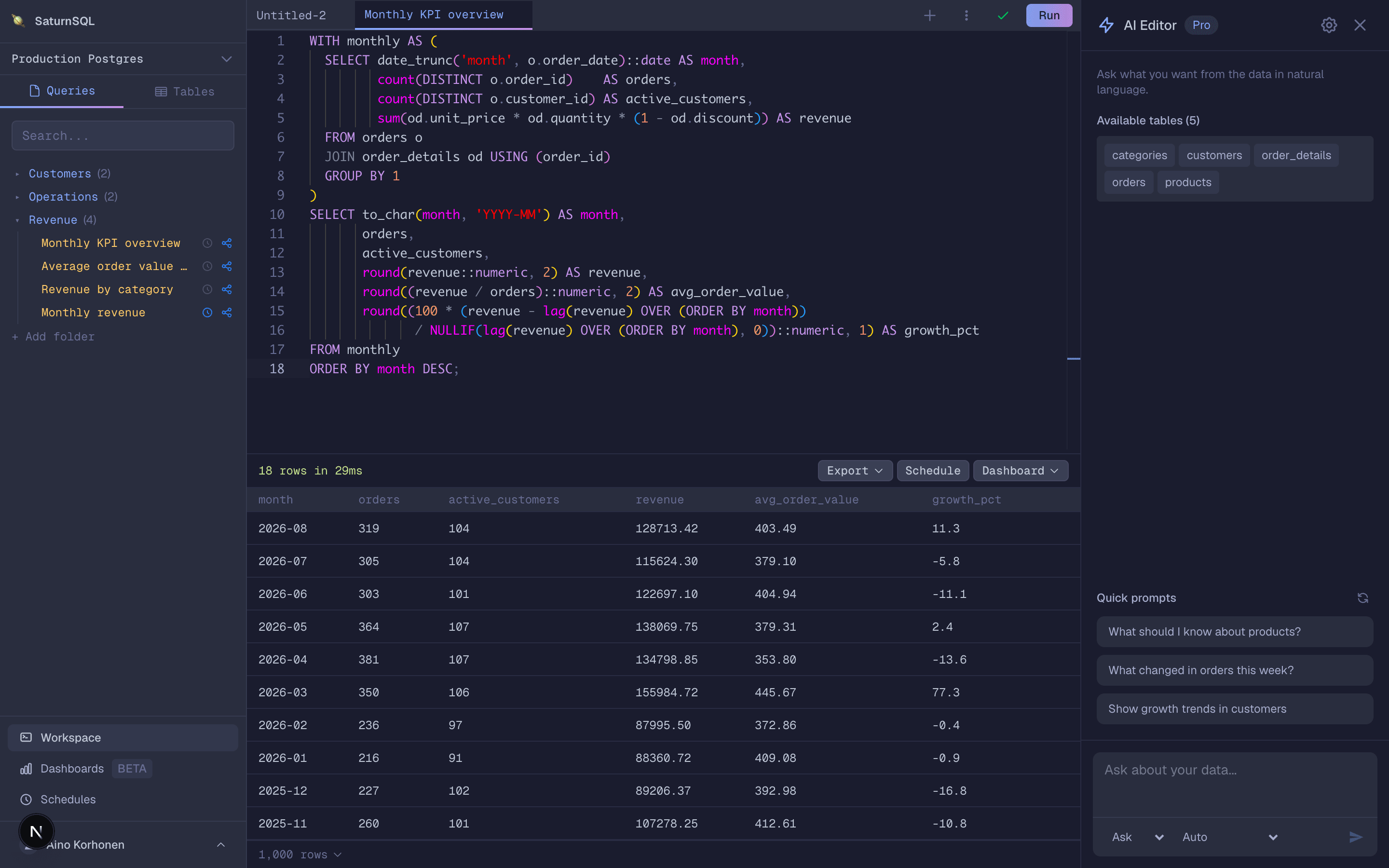
If the problem is the platform, the desktop clients below solve it and you may not need us at all. If the problem is that every person has their own copy of the connection, the password and the queries, that is a browser-based team editor’s job: connections added once and encrypted on the server, one shared query library, and saved queries that run on a schedule into Google Sheets or Slack.
A note on saved passwords
When HeidiSQL saves a session password, it keeps it in the Windows registry (or a settings file on Linux and macOS) using reversible encoding rather than real encryption. That is well known: a public Metasploit module recovers them. It is fine on a personal machine and easy to avoid with the “Prompt for credentials” option, but it is worth knowing if production passwords sit on a dozen laptops.
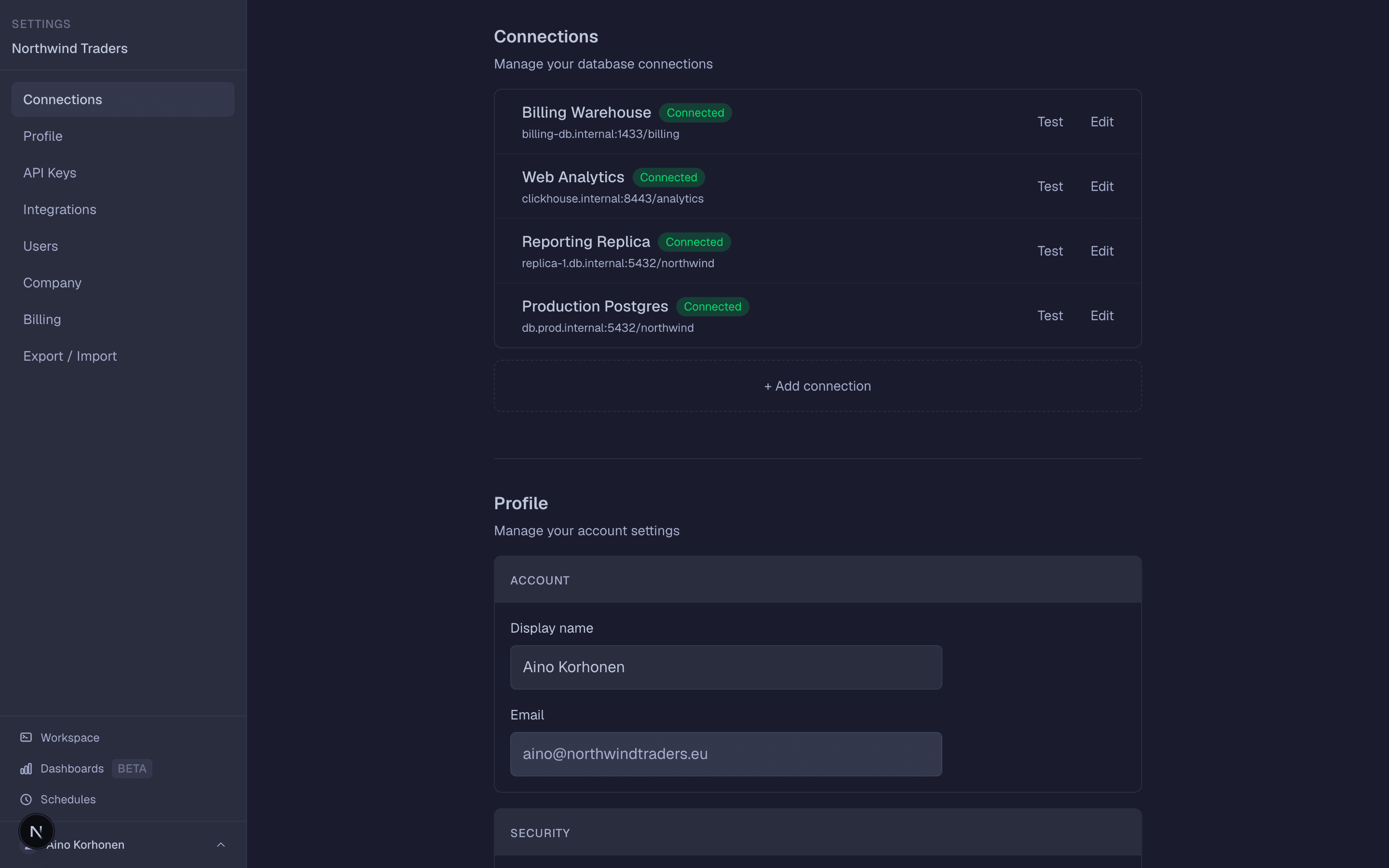
Most desktop clients store credentials on each machine in some form. A browser-based tool moves them to one place: in SaturnSQL they are encrypted with AES-256 on the server and never sent back to the browser. See how SaturnSQL handles credentials.
Why teams switch
Three things that quietly eat a data team's week, and what changes with SaturnSQL.
Queries nobody can find
Queries live in Slack threads, Google Docs, and random .sql files nobody can find when they need them.
One shared query library.Save a query once and anyone on the team can find it, run it, and build on it.
No shared database access
Credentials are shared over DMs. New team members wait days before they can even run a query.
Connect the database once.Teammates sign in and query it from day one, and nobody ever sees the password.
Reports refreshed by hand
Someone re-runs the same query every Monday and pastes the results into Google Sheets. It’s stale by Tuesday.
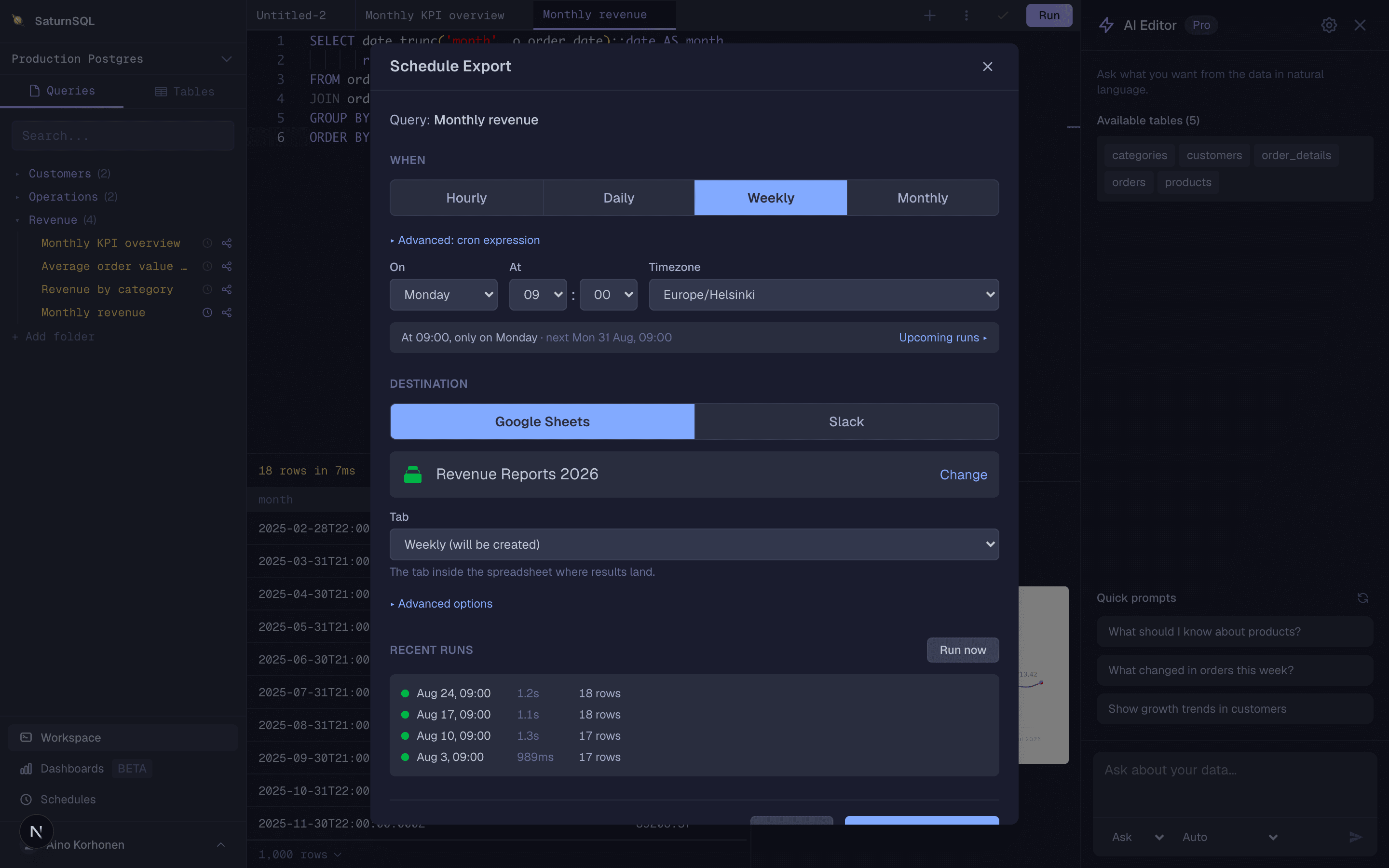
Schedule it once.It refills the Google Sheet or posts to Slack on its own, every hour or every Monday at 07:00.
The 6 best HeidiSQL alternatives
SaturnSQL
Best for: Teams that share queries, or anyone who needs reports to run without themSaturnSQL is a browser-based SQL editor for MySQL, MariaDB, PostgreSQL, SQL Server and five more engines, with a shared query library, scheduled delivery to Google Sheets and Slack, and credentials encrypted on the server rather than saved on each PC.
Strong
- + Runs in any browser, the same on Windows, macOS and Linux
- + Database credentials encrypted with AES-256 on the server, never stored on a laptop
- + Shared query library, so the team stops rewriting the same query
- + Scheduled delivery to Google Sheets and Slack
- + Hosted MCP server, so Claude, ChatGPT or Cursor can query your databases
- + Also a desktop app for macOS and Linux, free with every plan
Limits
- − A subscription, where HeidiSQL is free
- − No SQLite, Firebird or Interbase support
- − Fewer table-editing and server-administration tools than HeidiSQL
- − No self-hosting, and the free tier is a demo: 1 connection, 1 saved query
Pricing: Starter €19 per user per month, including scheduling and the MCP server, with a 14-day trial and no credit card. Pro is €79 per seat per month, through sales. Free tier is 1 connection and 1 saved query with no sharing. pricing page, checked 17 October 2026.
DBeaver
Best for: A free client that is mature on every platformDBeaver Community Edition is free under the Apache licence, mature on Windows, macOS and Linux, and connects to nearly every database, which makes it the usual next step for HeidiSQL users who need the same tool on every machine.
Strong
- + Community Edition is free with no seat or device limit
- + Equally mature on Windows, macOS (Intel and Apple Silicon) and Linux
- + Nearly every engine, plus ER diagrams and data transfer
Limits
- − Java-based, and much heavier than HeidiSQL
- − Desktop only, no shared query library
- − No scheduled delivery to Sheets or Slack
Pricing: Community Edition free and open source. Lite $113 per year, Enterprise $255 per year, Ultimate $510 per year. Team Edition from 3 users. pricing page, checked 17 October 2026.
Beekeeper Studio
Best for: A modern interface on any desktopBeekeeper Studio is a polished cross-platform desktop client with a far more modern interface than HeidiSQL, though its free Community Edition is meant only for individuals and small businesses.
Strong
- + Clean, modern interface on Windows, macOS and Linux
- + Many engines, including MySQL, MariaDB, PostgreSQL and SQL Server
- + Paid features keep working after cancelling, for versions released while you paid
Limits
- − Community Edition is for individuals and businesses under 10 employees or $1M revenue
- − Heavier than HeidiSQL
- − Shared queries only on Professional and up, no scheduled delivery
Pricing: Community Edition free for individuals and small businesses. Indie $9, Professional $14 and Business $18 per user per month billed yearly; monthly billing costs about twice as much. pricing page, checked 17 October 2026.
TablePlus
Best for: Paying once for a fast native app on every platformTablePlus is a fast native client for macOS, Windows and Linux with a perpetual licence from $99, the closest match to HeidiSQL’s speed for people willing to pay for polish.
Strong
- + Native and fast, close to HeidiSQL’s startup speed
- + Wide engine support, including SQLite and Redis
- + Perpetual licence that keeps working after the update year
Limits
- − Free version capped at 2 open tabs, 2 windows and 2 advanced filters
- − Licensed per device
- − No shared library, no scheduled delivery
Pricing: Basic $99 for one device, Standard $129 for two, Team $79 per seat starting at three seats. All perpetual with a year of updates; renewal is $59 per device. pricing page, checked 17 October 2026.
Sequel Ace
Best for: A free MySQL client for Mac users, on Intel or Apple SiliconSequel Ace is a free, MIT-licensed MySQL and MariaDB client for macOS that runs on both Intel and Apple Silicon Macs, which makes it the simplest free answer for Mac users HeidiSQL’s Apple Silicon-only build does not cover.
Strong
- + Free and open source (MIT)
- + Native Mac app on Intel and Apple Silicon
- + Actively maintained: 6.0.3 shipped 8 October 2026
Limits
- − MySQL and MariaDB only
- − macOS only, 13.5 or later
- − No team features, no scheduling
Pricing: Free and open source under the MIT licence. macOS 13.5+ (Intel and Apple Silicon), via the Mac App Store or Homebrew. pricing page, checked 17 October 2026.
DataGrip
Best for: Developers who want a full database IDEDataGrip is JetBrains’ database IDE with refactoring, inspections and version control, free for non-commercial use since October 2025, and everything HeidiSQL deliberately is not.
Strong
- + Free for non-commercial use since October 2025
- + IntelliJ-grade code intelligence and refactoring
- + Every major engine, on every platform
Limits
- − Heavy and slow to start next to HeidiSQL
- − The free licence cannot be used for commercial work
- − Single-user: no shared library, no scheduling
Pricing: Free for non-commercial use since October 2025. Organisations pay €259 per user per year, with a perpetual fallback licence after 12 months. pricing page, checked 17 October 2026.
If the problem is not the client
SaturnSQL is a browser-based MySQL editor that also covers MariaDB, PostgreSQL and SQL Server. Queries live in a shared library, and a saved query can run on a schedule into Google Sheets or Slack, so the weekly report stops depending on someone opening a desktop app.
It also runs a hosted MySQL MCP server, so Claude, ChatGPT or Cursor can answer questions from the database with each person signed in as themselves. If none of this is your problem, stay on HeidiSQL: on Windows it is hard to beat for free.
How we judged
We ranked on how well each tool covers what people use HeidiSQL for, fast table browsing and ad-hoc queries against MySQL and MariaDB, and on whether it removes the reason they are leaving. HeidiSQL’s platform and engine details come from its own website, help page, release notes and source code, read on 9 October 2026, and every price was re-checked on 17 October 2026. Each figure is linked from its entry above. Where a competitor beats SaturnSQL we have said so in its Limits list. See also our DBeaver alternatives, MySQL Workbench alternatives and the MySQL GUI guide.
Frequently asked questions
What is the best free HeidiSQL alternative?
DBeaver Community Edition is the strongest free option: open source under the Apache licence, mature on Windows, macOS and Linux, and it connects to nearly every database. On a Mac, Sequel Ace is a free, lighter choice for MySQL and MariaDB only.
Does HeidiSQL run on Mac?
Yes, since late 2025, but only on Apple Silicon Macs. HeidiSQL’s own help page says the macOS build does not run on Intel-based Macs, and the macOS build has no SQL Server support. On an Intel Mac, or for SQL Server on a Mac, use DBeaver, TablePlus, Beekeeper Studio or a browser-based client.
Does HeidiSQL run on Linux?
Yes. HeidiSQL has shipped native Linux builds since 2025, as deb and rpm packages, Flatpak and tarballs, including an arm64 build. The project describes running it under Wine as unstable and recommends the native build. SQL Server support on Linux is still being rebuilt and is described as not yet fully mature.
Is HeidiSQL safe for storing database passwords?
If you let HeidiSQL save passwords, they are kept in the Windows registry (or a settings file on Linux and macOS) using reversible encoding rather than real encryption, and a public Metasploit module can recover them. Choosing “Prompt for credentials” avoids saving them. Browser-based tools such as SaturnSQL keep credentials encrypted on the server instead of on each machine.
Can HeidiSQL share queries with a team or run them on a schedule?
No. HeidiSQL is a single-user desktop client: sessions can be moved between machines by exporting and importing a settings file, but there is no shared query library and no scheduled export. SaturnSQL adds a shared library and scheduled delivery to Google Sheets and Slack, from €19 per user per month.
Is there a HeidiSQL alternative that works with Claude or ChatGPT?
Yes. SaturnSQL includes a hosted MCP server on the Starter plan. Add https://mcp.saturnsql.com/mcp to Claude, ChatGPT, Cursor or Claude Code, sign in, and the assistant can read your MySQL, MariaDB, PostgreSQL or SQL Server schema and run queries without ever seeing the database password.
Shared MySQL queries and scheduled reports, in the browser, from €19 per user per month.
