7 Best Oracle SQL Developer Alternatives in 2026
Seven Oracle SQL Developer alternatives compared on Oracle support, editor quality and price, including Oracle's own VS Code extension.
- Free for 14 days, no credit card
- Desktop app for Mac and Linux
- Rated 5.0 on G2 (2 reviews)
Updated 17 October 2026. Prices checked 17 October 2026 against each vendor’s own pricing page.
The official successor, free, and where Oracle now ships features
- DBeaverFree / $113/yr
Free, cross-platform, and Oracle alongside every other engine you run
- DataGripFree non-commercial / €259/yr
IDE-grade code intelligence for PL/SQL and SQL
- Try SaturnSQL freeSaturnSQL€19/user/mo
Teams who query Oracle and need the results to reach other people on a schedule
- Toad for Oracle€857/user/yr
The deepest Oracle DBA and tuning toolset, on Windows and macOS, at a price
- TablePlus$99 once
A fast native Mac client that happens to speak Oracle
- DbVisualizerFree / $199 first yr
A free tier you can use at work, with Oracle covered through JDBC
Feature comparison
| SaturnSQL | SQL Developer for VS Code | DBeaver | DataGrip | Toad for Oracle | TablePlus | |
|---|---|---|---|---|---|---|
| Free for commercial use* | ~ | ✓ | ✓ | — | — | ~ |
| Browser-based | ✓ | — | — | — | — | — |
| Runs on macOS / Linux | ✓ | ✓ | ✓ | ✓ | ~ | ✓ |
| PL/SQL debugger* | — | ✓ | — | — | ✓ | — |
| Shared query library | ✓ Paid | — | — | — | — | — |
| Scheduled queries* | ✓ Paid | — | — | — | ~ | — |
| Export to Google Sheets | ✓ Paid | — | — | — | — | — |
| Send to Slack | ✓ Paid | — | — | — | — | — |
| Schema autocomplete | ✓ | ✓ | ✓ | ✓ | ✓ | ✓ |
| Oracle Database | ✓ | ✓ | ✓ | ✓ | ✓ | ~ |
| PostgreSQL | ✓ | — | ✓ | ✓ | — | ✓ |
| MySQL / MariaDB | ✓ | — | ✓ | ✓ | — | ✓ |
| SQL Server | ✓ | — | ✓ | ✓ | — | ✓ |
| BigQuery | ✓ | — | ✓ | ✓ | — | ✓ |
| Licence model | Subscription | Free | Free / sub | Subscription | Subscription | Perpetual |
| Starting price | €19/user/mo | Free | Free | Free non-comm. | €857/yr | $99 once |
✓ available · ✓ Paid = not on the free tier · Pro = Pro plan · ~ partial · ? not documented by the vendor · — not available
- Free for commercial use: DataGrip is free for non-commercial use only. TablePlus’s free tier is capped at 2 tabs. SaturnSQL’s free tier is 1 connection and 1 saved query.
- PL/SQL debugger: DBeaver’s only debugger is for PostgreSQL; Oracle PL/SQL debugging is an open feature request.
- Scheduled queries: Toad’s Automation Designer runs through Windows Task Scheduler on the machine Toad is installed on.
Prices checked 17 October 2026 against each vendor’s own pricing page: SaturnSQL · SQL Developer for VS Code · DBeaver · DataGrip · Toad for Oracle · TablePlus.
Why people leave SQL Developer
Oracle SQL Developer is free, complete, and has been the default Oracle client for twenty years. People go looking for an alternative for three reasons: it is a Java desktop app that starts slowly and behaves worst on a Mac, it only speaks Oracle while the rest of the stack has moved to Postgres, and Oracle itself has said the desktop version is no longer where new features go.
That last point changes the list. In October 2024 Oracle’s database tools product manager wrote that the VS Code extension “is the future of SQL Developer”, that all active development happens there, and that the desktop app would get bug fixes only, with an 18-month maintenance window running to April 2026. Desktop builds still ship, so nothing breaks. But if you are choosing a tool today, the honest first alternative to SQL Developer is Oracle’s own replacement for it.
If the problem is the reports, not the editor
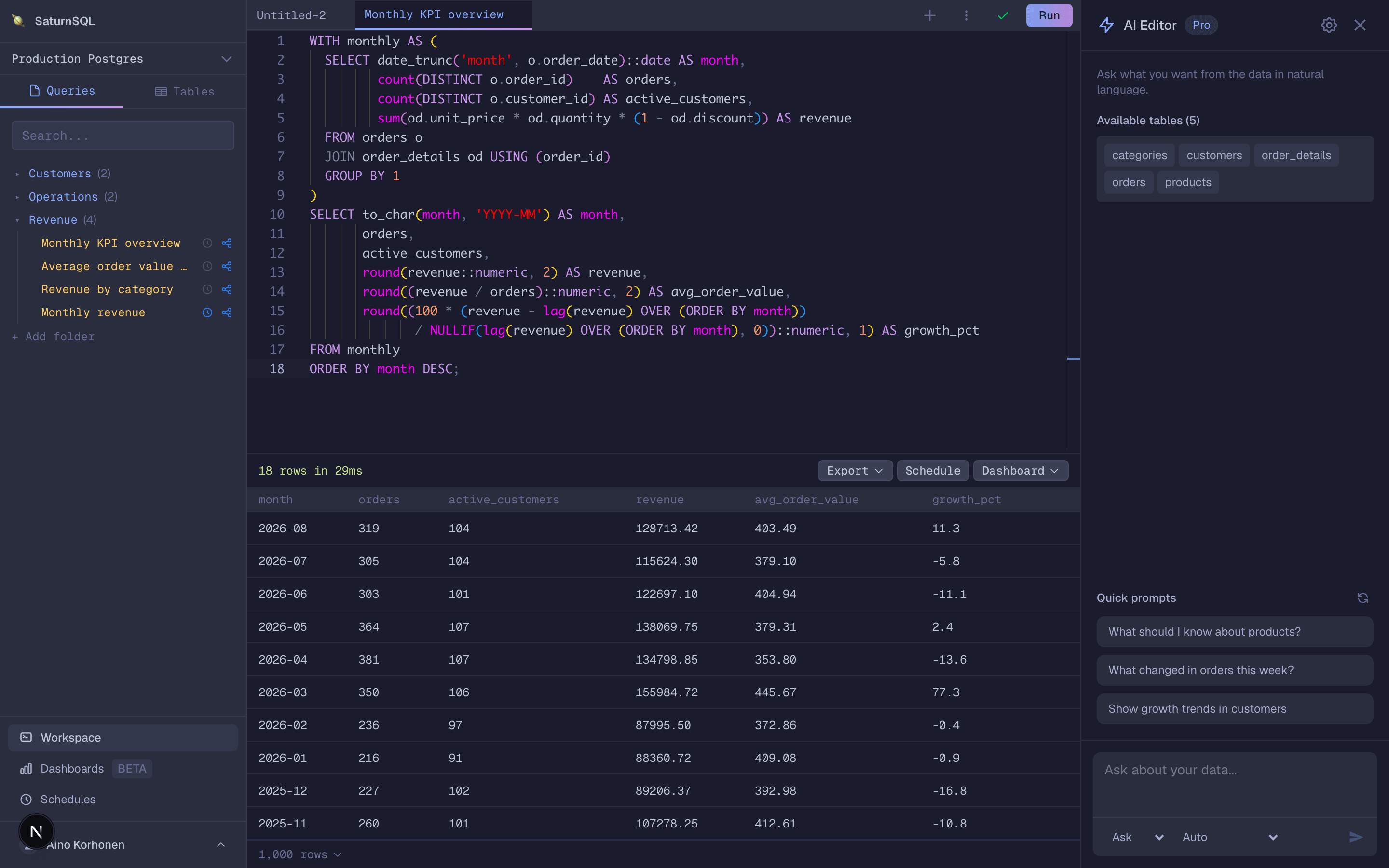
Two tools below are free and official. If what you actually need is for an Oracle query to reach other people every Monday without anyone opening a desktop app, SaturnSQL is the browser-based option on this list: connect by service name, keep queries in a shared library, and schedule exports to Google Sheets and Slack. There is a free plan to start on and a connection guide that takes five minutes.
Why teams switch
Three things that quietly eat a data team's week, and what changes with SaturnSQL.
Queries nobody can find
Queries live in Slack threads, Google Docs, and random .sql files nobody can find when they need them.
One shared query library.Save a query once and anyone on the team can find it, run it, and build on it.
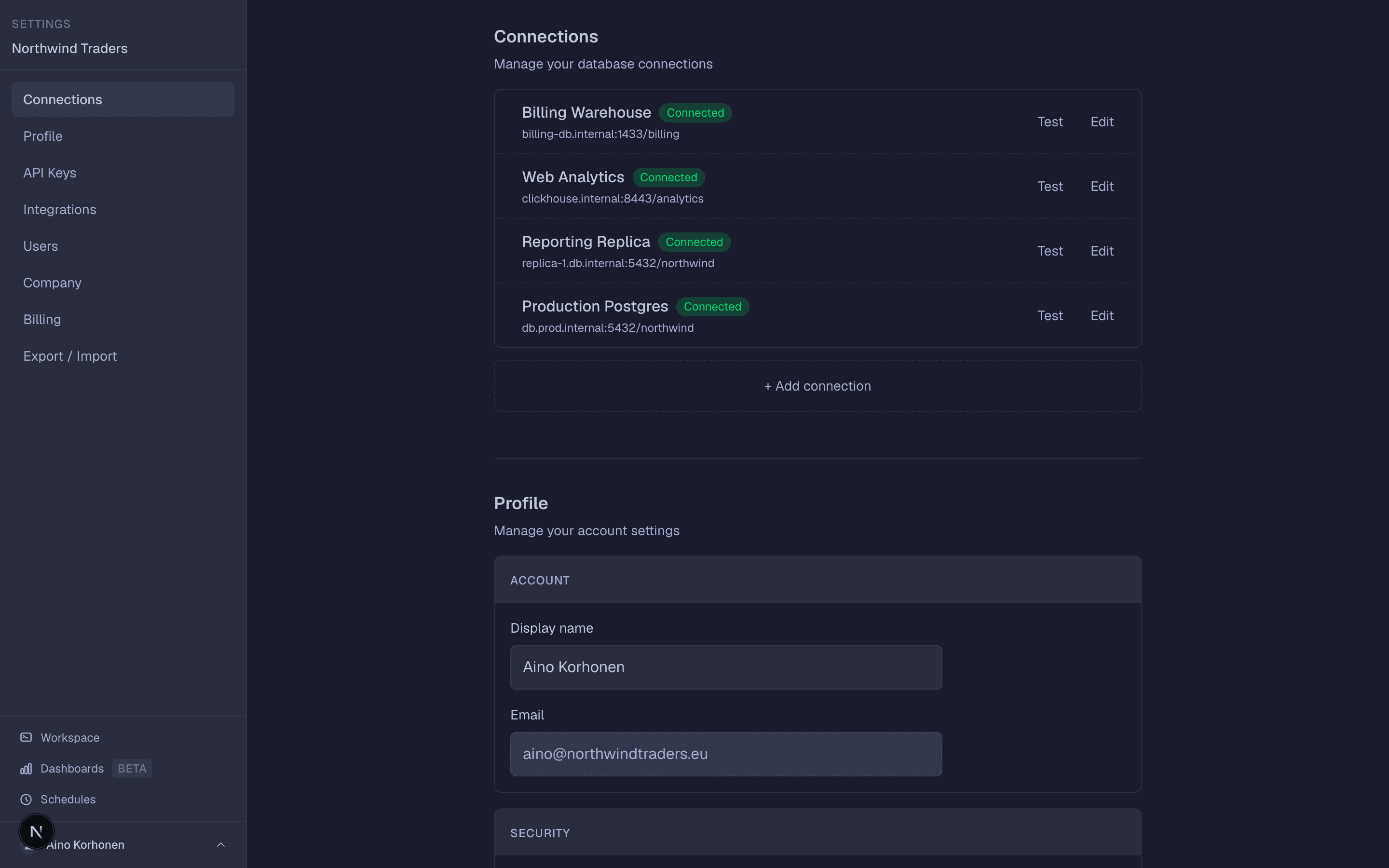
No shared database access
Credentials are shared over DMs. New team members wait days before they can even run a query.
Connect the database once.Teammates sign in and query it from day one, and nobody ever sees the password.
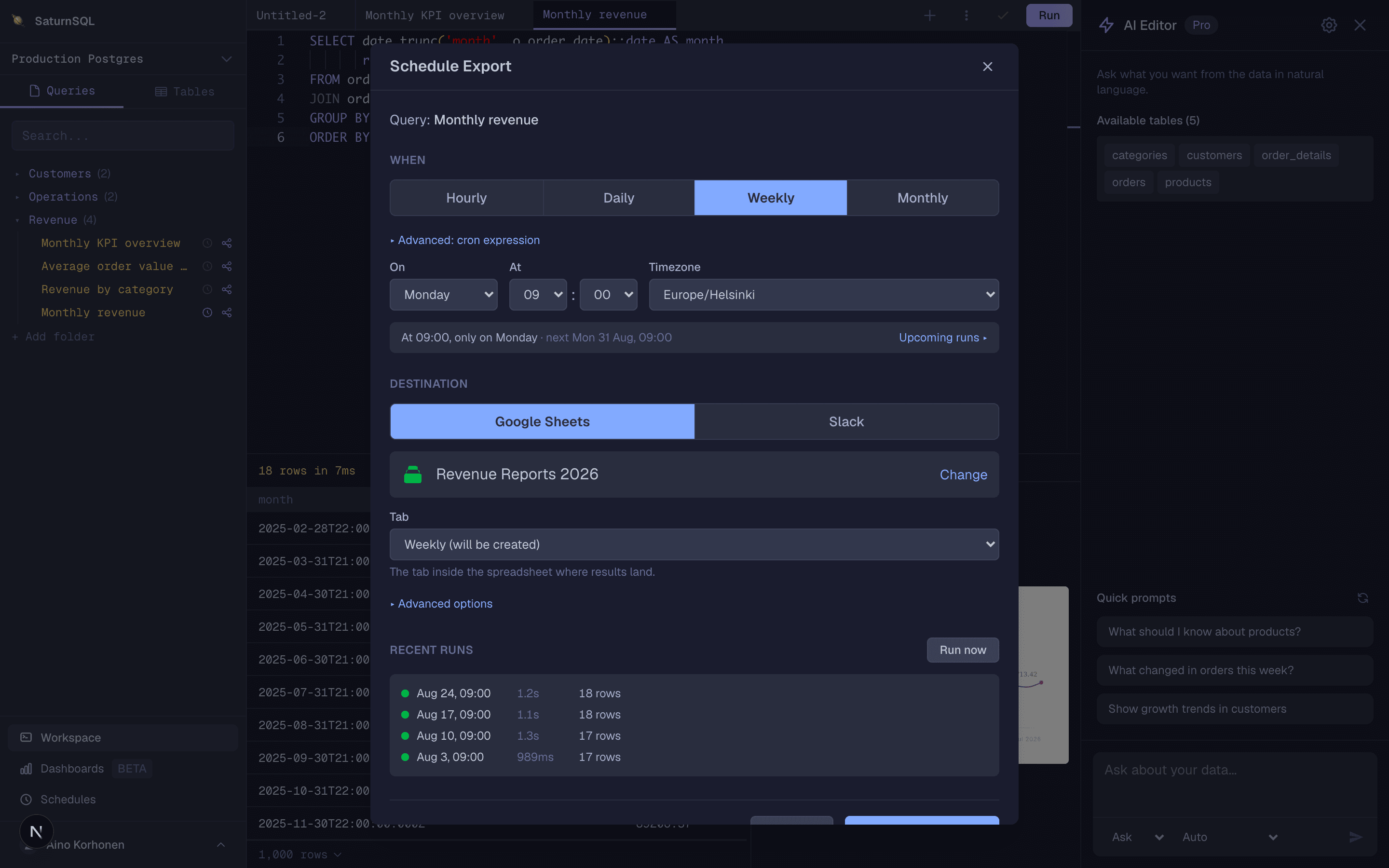
Reports refreshed by hand
Someone re-runs the same query every Monday and pastes the results into Google Sheets. It’s stale by Tuesday.
Schedule it once.It refills the Google Sheet or posts to Slack on its own, every hour or every Monday at 07:00.
The 7 best Oracle SQL Developer alternatives
SQL Developer for VS Code
Best for: The official successor, free, and where Oracle now ships featuresOracle’s own SQL Developer extension for Visual Studio Code is the alternative Oracle itself recommends: free, natively built for Apple Silicon, Windows and Linux, and the only place new SQL Developer features have landed since 2024.
Strong
- + Free, official, and under active development with releases every few months
- + Native Apple Silicon build; no Java install to manage
- + SQLcl, PL/SQL debugging, charts and an MCP server for AI assistants built in
Limits
- − You live in VS Code, which is a different tool than a database GUI for many DBAs
- − Oracle only: Postgres, MySQL and SQL Server need other extensions
- − Single user on one machine: no shared queries, no scheduled runs
Pricing: Free extension from the Visual Studio Marketplace. Release 26.3.0 shipped in September 2026. pricing page, checked 17 October 2026.
DBeaver
Best for: Free, cross-platform, and Oracle alongside every other engine you runDBeaver Community Edition is the free alternative most Oracle developers actually land on: it speaks Oracle over the thin JDBC driver with no client install, and it opens the Postgres and SQL Server databases sitting next to your Oracle instance in the same window.
Strong
- + Free and open source with no organisation-size condition
- + Oracle plus nearly every other engine in one client
- + ER diagrams, data transfer and SQL formatting built in
Limits
- − Java-based, so heavier and slower to start than SQL Developer for VS Code
- − No Oracle PL/SQL debugger at all, and some Oracle-specific tooling sits in the paid editions
- − Desktop only: no shared query library, no scheduled delivery
Pricing: Community Edition free. Lite $113 per year. Enterprise $255 per year. Ultimate $510 per year. CloudBeaver Enterprise, the browser product, $1,025 per year. pricing page, checked 17 October 2026.
DataGrip
Best for: IDE-grade code intelligence for PL/SQL and SQLDataGrip brings JetBrains refactoring, inspections and completion to Oracle SQL and PL/SQL, free for non-commercial use since October 2025 and €259 per user per year at work, with the trade that it does not debug PL/SQL.
Strong
- + IntelliJ-grade completion, refactoring and inspections across Oracle and every other engine
- + Free for non-commercial use since October 2025
- + Version control integration for SQL files
Limits
- − No PL/SQL debugger, which is a hard stop for some Oracle developers
- − The free licence cannot be used for commercial work
- − Single-user IDE: no shared library, no scheduling
Pricing: Free for non-commercial use since October 2025, renewed annually and requiring anonymised usage telemetry. Organisations pay €259 per user per year, with a perpetual fallback licence after 12 months. pricing page, checked 17 October 2026.
SaturnSQL
Best for: Teams who query Oracle and need the results to reach other people on a scheduleSaturnSQL is a browser-based SQL editor that connects to Oracle by service name with nothing to install, keeps queries in a library the whole team can see, and runs them on a schedule into Google Sheets or Slack, which no desktop Oracle client does.
Strong
- + Browser-based: works the same on a Mac, a Windows laptop and a locked-down thin client
- + Shared query library, so an Oracle report outlives whoever wrote it
- + Scheduled delivery to Google Sheets and Slack, plus real .xlsx export
- + Oracle alongside PostgreSQL, MySQL/MariaDB, SQL Server, Redshift, ClickHouse, BigQuery and DynamoDB
- + Hosted MCP server, so Claude, ChatGPT or Cursor can query your databases
- + Also a desktop app for macOS and Linux, free with every plan
Limits
- − Not an Oracle development environment: no PL/SQL debugger, no Data Modeler, no DBA panels
- − Connects by service name over TCP or TLS; SID-only, TNS names, RAC SCAN and wallet-only Autonomous connections are not supported
- − Your queries run through our servers, and the free tier is a demo: 1 connection, 1 saved query
Pricing: Starter €19 per user per month, including scheduling. Pro is €79 per seat per month, through sales. Free tier is 1 connection and 1 saved query with no sharing. pricing page, checked 17 October 2026.
Toad for Oracle
Best for: The deepest Oracle DBA and tuning toolset, on Windows and macOS, at a priceToad for Oracle is the tool SQL Developer users move to when they outgrow it, not away from it: unmatched for tuning, code review and DBA work, on Windows and macOS, and from €857 per user per year for the Base edition.
Strong
- + Deepest Oracle-specific tooling on the market: SQL Optimizer, Code Analysis, Automation Designer
- + Automation Designer schedules scripts and reports through Windows Task Scheduler
- + Decades of DBA adoption, so the workflows match how Oracle shops already operate
Limits
- − Windows and macOS only, and it needs an Oracle Client installed alongside it
- − €857 per user per year for Base, rising to €5,526 for DBA Plus with Toad Data Modeler
- − Oracle only: separate Toad products, and separate invoices, for other engines
Pricing: Base €857, Professional €1,281, Professional DB Admin €2,012, Xpert Plus €2,682, Dev Plus €3,042 and DBA Plus with Toad Data Modeler €5,526, all per user per year. AI-enabled editions cost more (Base AI €1,019). Prices from Quest’s own online shop. pricing page, checked 17 October 2026.
TablePlus
Best for: A fast native Mac client that happens to speak OracleTablePlus is the answer for Mac users who want an Oracle client that starts instantly and looks like a Mac app, bought once for $99, with the caveat that it is a query tool rather than an Oracle development environment.
Strong
- + Genuinely fast and native on macOS, Windows and Linux
- + Perpetual licence from $99, no subscription
- + Oracle (macOS app only) alongside Postgres, MySQL, SQL Server, SQLite and more
Limits
- − No PL/SQL debugger or Oracle-specific tooling
- − Free tier caps you at 2 open tabs and 2 windows at once
- − Single seat: no shared query library, nothing runs on a schedule
Pricing: Basic $99 for one device, Standard $129 for two, Team $79 per seat starting at three seats. All perpetual, each including one year of updates and support. pricing page, checked 17 October 2026.
DbVisualizer
Best for: A free tier you can use at work, with Oracle covered through JDBCDbVisualizer has a free tier with no organisation-size condition and long-standing Oracle support through JDBC, plus Pro from $199 per user for the first year, a mature and unglamorous alternative to SQL Developer.
Strong
- + Free tier with the standard feature set, no time limit, no company-size condition
- + Very broad engine support through JDBC, Oracle included
- + Perpetual fallback licence included in the subscription
Limits
- − Java-based desktop app, and it looks it
- − No PL/SQL debugger
- − No shared query library or scheduled delivery
Pricing: Free version with the standard feature set. Pro $199 per user for the first year with 60-day basic support, $229 with premium support; renewals $89 and $119 per user per year. Volume and academic discounts available. pricing page, checked 17 October 2026.
The case for staying
Worth saying plainly, since this page exists to sell you something else: SQL Developer desktop is free, it still gets bug fixes, and it does things none of the third-party tools do as well, in particular the PL/SQL debugger and the Data Modeler. If your complaint is only that it feels dated, the VS Code extension is a free upgrade from the same team and you lose nothing. Switch to a third-party tool because you need something SQL Developer does not do, such as opening your Postgres databases in the same window or getting a query result to a colleague on a schedule. Not because a new UI is nicer.
If the problem is not the client
Every tool above, SQL Developer included, has the same shape: software on one machine, queries that only that machine can see, and nothing happening when the app is closed. Toad’s Automation Designer is the one exception and it still needs a Windows box left running. That is fine for development. It stops being fine at the point where finance needs the month-end extract every first working day and the person who wrote the query is on holiday.
SaturnSQL is the other shape: a shared query library in the browser that connects to Oracle by service name, can run a saved query on a schedule, and delivers the rows to Google Sheets, Slack or a real .xlsx file. Be clear about the trade: it is not an Oracle development environment. There is no PL/SQL debugger, no Data Modeler, no DBA panels, and it does not connect through TNS names, SIDs or Autonomous wallets. Most teams keep SQL Developer or its VS Code extension for development and use SaturnSQL for the recurring reports. See the Oracle GUI page for how it compares as a day-to-day client.
How we judged
We ranked on how well each tool covers what SQL Developer is actually used for, which is writing and running Oracle SQL and PL/SQL day to day, and we weighted platform support and licence clarity heavily because those are what bring most people to this page. Oracle’s pages for SQL Developer and the VS Code extension were read on 12 September 2026. Toad for Oracle has no list price on quest.com, so its figures were read from SoftwareAdvice’s listing the same day and a quote from Quest may differ. Every price was re-checked against each vendor’s own pricing page on 17 October 2026 and is linked from its entry above. See also our DBeaver alternatives, DataGrip alternatives and SQL clients for Mac roundups, and the Oracle SQL guides.
Frequently asked questions
Is Oracle SQL Developer deprecated?
Not deprecated, but no longer where Oracle builds new things. In October 2024 Oracle’s database tools product manager wrote that the VS Code extension is the future of SQL Developer, that all active development is happening there, and that the desktop app would receive bug fixes only, with an 18-month maintenance window running to April 2026. Desktop builds still ship (26.2 arrived in July 2026), so nothing stops working. The new features simply land in Visual Studio Code.
What is the best free alternative to Oracle SQL Developer?
Oracle’s own SQL Developer for VS Code if you want the official toolset, including the PL/SQL debugger and SQLcl, without the Java desktop app. DBeaver Community Edition if you want a standalone GUI that also opens your Postgres, MySQL and SQL Server databases. Both are free for commercial use with no company-size condition. DbVisualizer’s free tier is a third option.
Does Oracle SQL Developer work on a Mac?
Yes, but it is the platform users complain about most: it needs a Java 17 or later runtime, starts slowly, and the Mac build tends to lag the Windows one. The SQL Developer extension for VS Code has a native Apple Silicon build and is the better answer on a Mac today. DBeaver, DataGrip and TablePlus all run natively on macOS too. A browser-based client such as SaturnSQL sidesteps the question, since there is nothing to install.
How much does Toad for Oracle cost?
From €857 per user per year for the Base edition, rising through Professional at €1,281 and Professional DB Admin at €2,012 to €5,526 for DBA Plus with Toad Data Modeler. These are the prices in Quest’s own online shop; AI-enabled editions cost more, and a quote may differ. Toad runs on Windows and macOS and needs an Oracle Client installed alongside it.
Which Oracle SQL Developer alternative can run a query on a schedule?
Among desktop tools, only Toad, through its Automation Designer, and it runs via Windows Task Scheduler on the machine Toad is installed on, so the laptop has to be on. SaturnSQL runs saved Oracle queries server-side on a cron cadence and delivers the rows to Google Sheets or Slack, with nobody at a keyboard. The other tools on this list run queries only while someone is sitting in front of them.
Does SaturnSQL replace Oracle SQL Developer?
Only for the querying and reporting part. SaturnSQL connects to Oracle by service name, gives the team a shared query library, schedules exports to Google Sheets and Slack, and exports real .xlsx files. It has no PL/SQL debugger, no Data Modeler and no DBA panels, and it does not support SID-only, TNS-name, RAC SCAN or wallet-only Autonomous connections. Most teams keep SQL Developer or its VS Code extension for development and use SaturnSQL for the recurring reports that used to be someone’s Monday morning job.
Is there a Oracle SQL Developer alternative that works with Claude or ChatGPT?
Yes. SaturnSQL includes a hosted MCP server on the Starter plan. Add https://mcp.saturnsql.com/mcp to Claude, ChatGPT, Cursor or Claude Code, sign in with your SaturnSQL account, and the assistant can list your connections, read schemas and run queries with the same row limits as the editor. It never sees your database passwords, and no API key is needed.
Oracle queries in the browser, shared with the team and delivered on a schedule, from €19 per user per month.
