7 Best DBeaver Alternatives in 2026
Seven DBeaver alternatives compared on weight, engine support and team features, from lighter native clients to a browser-based workspace.
- Free for 14 days, no credit card
- Desktop app for Mac and Linux
- Rated 5.0 on G2 (2 reviews)
Updated 17 October 2026. Prices checked 8 August 2026 against each vendor’s own pricing page.
- Try SaturnSQL freeSaturnSQL€19/user/mo
Teams that want a shared, browser-based workspace
- TablePlus$99 once
A fast native GUI with a one-time licence
- Beekeeper StudioFree / $9/mo
Open-source, local-first desktop client
- DataGripFree non-comm.
A full database IDE for power users
- HeidiSQLFree
A free, lightweight client on Windows
- pgAdminFree
Free and dedicated to PostgreSQL
SQL Server, now that Azure Data Studio is retired
Feature comparison
| SaturnSQL | DBeaver | TablePlus | Beekeeper | DataGrip | |
|---|---|---|---|---|---|
| Free tier | ✓ | ✓ | ✓ | ✓ | ✓ |
| Browser-based (no install) | ✓ | — | — | — | — |
| Shared query library | ✓ | — | — | — | — |
| AI SQL assistant | ✓ | ✓ | — | — | ✓ |
| Scheduling | ✓ | — | — | — | — |
| Export to Google Sheets | ✓ | — | — | — | — |
| CSV & Excel export | ✓ | ✓ | ✓ | ✓ | ✓ |
| Schema autocomplete | ✓ | ✓ | ✓ | ✓ | ✓ |
| DB administration features | — | ✓ | — | — | ✓ |
| Very wide DB support | — | ✓ | ✓ | — | ✓ |
| Starting price | €19/mo | Free / $113/yr | $99 once | Free / $9/mo | Free non-comm. |
Why people leave DBeaver
DBeaver is a capable universal database client, but it is a single-user desktop app: it is Java-based and can feel heavy, everyone on your team installs and updates it separately, and there is no built-in way to share a query library or schedule a recurring report. Some people want a lighter native client, others a browser-based tool the whole team can use, and the list above has both.
First, decide which problem you’re solving
Those are two different complaints. A heavy desktop app has desktop cures, and several in the roundup below are free. The single-user workflow does not: if queries live on one laptop and the weekly report is exported by hand, every desktop client on this list leaves that exactly as it is. That is a browser-based team editor’s job, with a shared query library and saved queries that run on a schedule straight into Google Sheets or Slack. See how SaturnSQL handles it, or keep reading, it is in the list below too.
Why teams switch
Three things that quietly eat a data team's week, and what changes with SaturnSQL.
Queries nobody can find
Queries live in Slack threads, Google Docs, and random .sql files nobody can find when they need them.
One shared query library.Save a query once and anyone on the team can find it, run it, and build on it.
No shared database access
Credentials are shared over DMs. New team members wait days before they can even run a query.
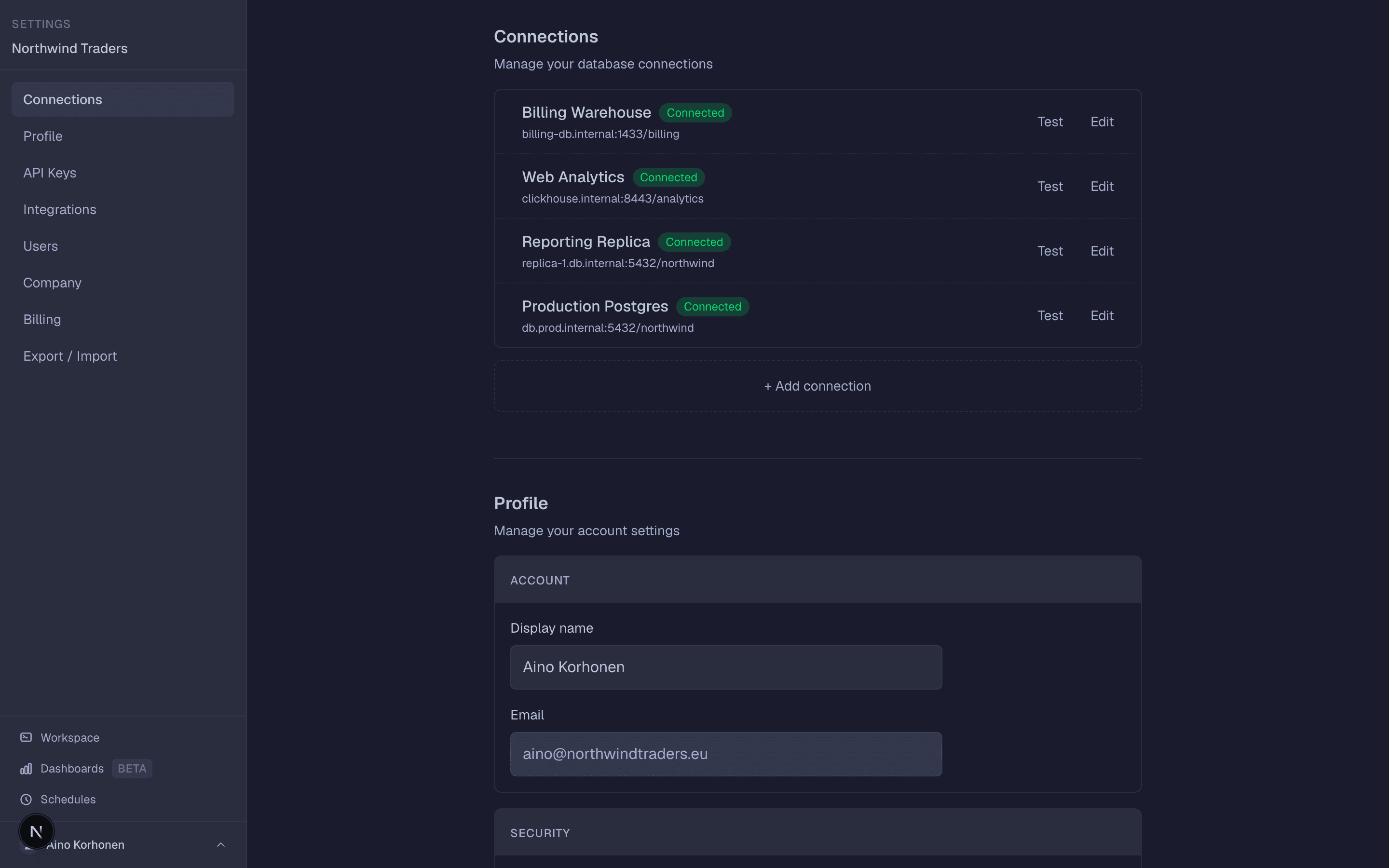
Connect the database once.Teammates sign in and query it from day one, and nobody ever sees the password.
Reports refreshed by hand
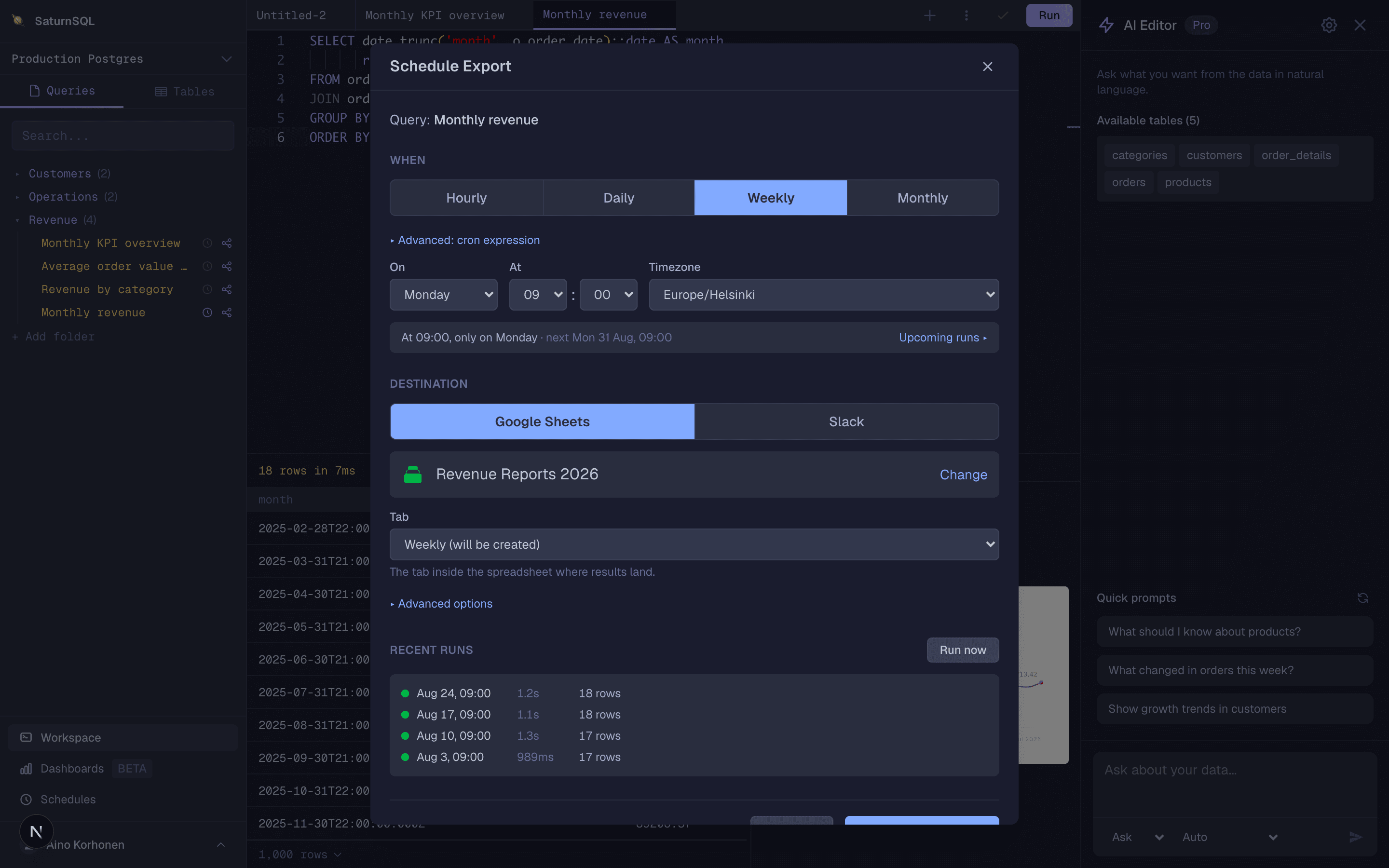
Someone re-runs the same query every Monday and pastes the results into Google Sheets. It’s stale by Tuesday.
Schedule it once.It refills the Google Sheet or posts to Slack on its own, every hour or every Monday at 07:00.
SaturnSQL
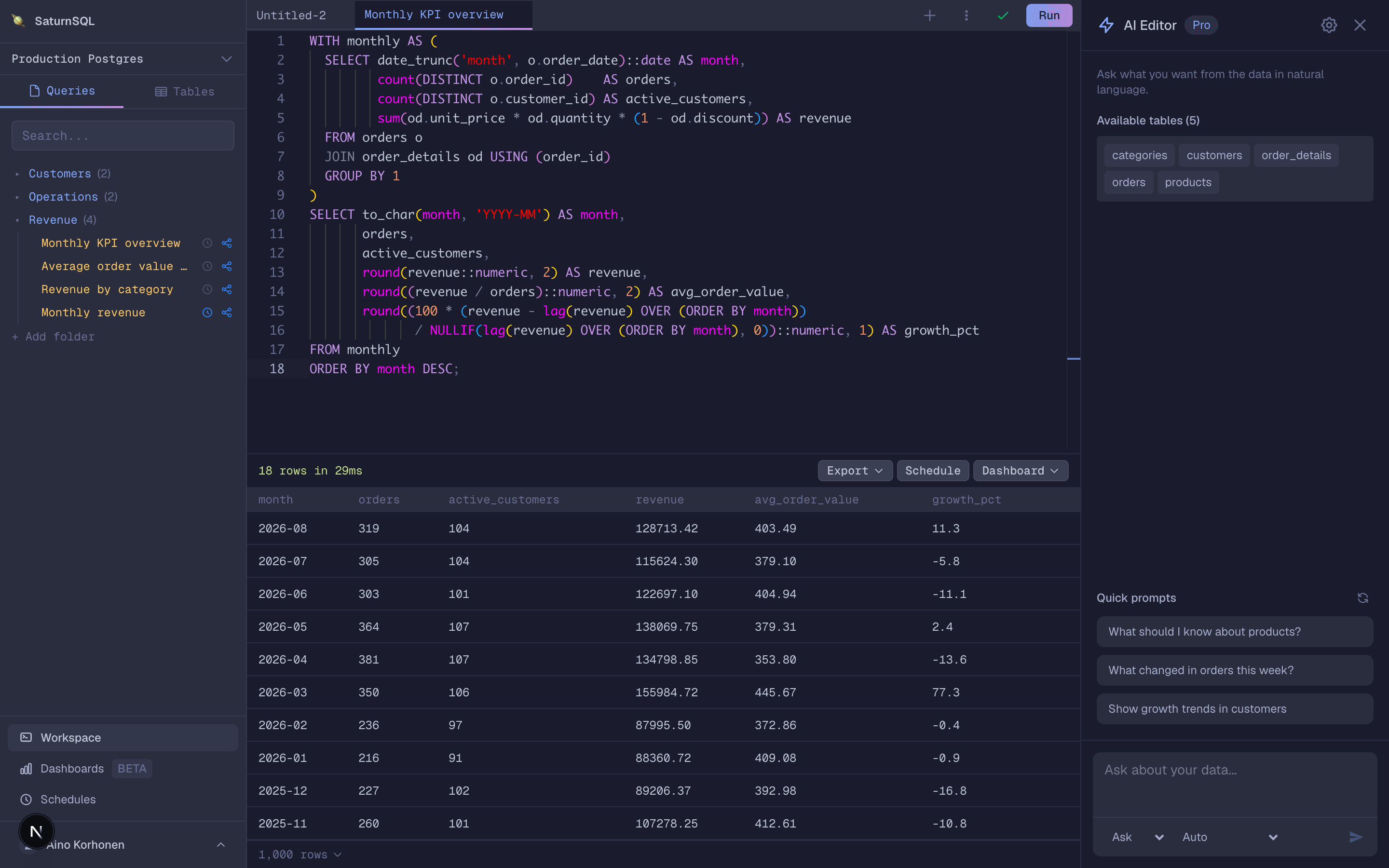
SaturnSQL is the alternative to reach for when the problem with DBeaver is not the editor but the fact that it lives on one person’s laptop. It is a collaborative SQL editor that runs entirely in the browser, so there is nothing to install or keep updated. It also comes as a desktop app for Mac and Linux, free with every plan. Queries live in a shared library the whole team can see, and you can schedule a query to run daily or weekly and push the results to Google Sheets automatically.
It supports PostgreSQL, MySQL/MariaDB, Microsoft SQL Server, Oracle, Amazon Redshift, ClickHouse, BigQuery, and DynamoDB, with schema-aware autocomplete and an AI assistant for writing and debugging SQL against your live schema. If you would rather ask Claude, ChatGPT or Cursor, the hosted MCP server lets them query the same connections. It is not a database administration console — if you need to manage users, tune indexes, or import dump files, keep DBeaver for that. SaturnSQL is for the day-to-day querying, reporting, and sharing that a team does together. See the full SaturnSQL vs DBeaver comparison.
Pricing: Free tier available. Paid plans start from €19/month per user.
TablePlus
TablePlus is the go-to answer for people who find DBeaver sluggish. It is a fast, native GUI with a clean interface, available on macOS, Windows, and Linux. If you mostly browse tables, edit rows, and run ad-hoc queries as a solo developer, it is a noticeably snappier experience. Like DBeaver, it is single-user with no shared library or scheduling.
Pricing: Free tier (2 open tabs and 2 windows). License from $99 one-time. See our TablePlus alternatives roundup.
Beekeeper Studio
Beekeeper Studio is a modern, open-source, cross-platform SQL client. It supports MySQL, PostgreSQL, SQLite, SQL Server, and more, with a polished, uncluttered UI. If you like that DBeaver is free but not that it is heavy, Beekeeper is the natural local-first replacement — privacy-friendly, everything stays on your machine.
Pricing: Free Community Edition, intended for organisations under 10 staff and/or under $1M revenue. Indie from $9/month billed annually.
DataGrip
DataGrip by JetBrains is the choice if you want more than DBeaver, not less. It offers IntelliJ-grade code intelligence, refactoring, and version control integration. Best for developers already living in JetBrains tools who want deep SQL inspections and schema navigation. It is a subscription, and like the others it is a single-user IDE.
Pricing: Free for non-commercial use since October 2025. Organisations €259 per user per year. See our DataGrip alternatives roundup.
HeidiSQL
HeidiSQL is a long-standing free Windows client focused on MySQL, MariaDB, PostgreSQL, and SQL Server. It is lightweight and fast, and a favorite of Windows developers who want something simpler than DBeaver. Native Linux builds arrived in 2025 and an Apple Silicon Mac build in late 2025, so it is no longer Windows-only, but it is still a Windows-first tool. See HeidiSQL alternatives.
Pricing: Free and open source (Windows, Linux and Apple Silicon Mac).
pgAdmin
pgAdmin is the free, official administration and development tool for PostgreSQL. If every database you touch is Postgres, pgAdmin gives you the deepest native admin features. It only speaks Postgres, though, so it is a poor fit if you also need MySQL or SQL Server — which is exactly where DBeaver’s universal support earns its keep.
Pricing: Free and open source (PostgreSQL only).
VS Code + SQL extensions
VS Code with the official MSSQL or PostgreSQL extensions is free, cross-platform, and now Microsoft’s recommended SQL client. It inherited that role from Azure Data Studio, which was retired on 28 February 2026 and no longer receives updates or security patches. Existing queries, scripts and database projects open in VS Code without conversion. It is assembled from extensions rather than being a single coherent client, so schema navigation and data editing are weaker than DBeaver’s, but if you already live in VS Code it costs nothing to try.
Pricing: Free (cross-platform), including for commercial use.
Which one should you choose?
Choose SaturnSQL if the real problem is collaboration: you want your team writing, sharing, and scheduling queries in one browser-based workspace, with results flowing to Google Sheets, and nobody managing installs.
Choose TablePlus or Beekeeper Studio if you want a faster, lighter native desktop client than DBeaver and you work mostly solo.
Choose DataGrip if you want a heavier, more powerful IDE, not a lighter one, and you already use JetBrains tools.
Choose HeidiSQL, pgAdmin, or VS Code if you want a free client tuned to one ecosystem (Windows, PostgreSQL, or SQL Server respectively).
Frequently asked questions
What is the best free DBeaver alternative?
HeidiSQL (open source, Windows) and pgAdmin (PostgreSQL) are free with no conditions, and VS Code with SQL extensions is free on every operating system. Beekeeper Studio’s Community Edition is open source too, but its licence is intended for organisations under 10 employees or $1M revenue. SaturnSQL’s free tier is limited to one connection and one saved query, so treat it as a trial of the team features.
What is a lighter DBeaver alternative for Mac?
TablePlus is the usual pick: a native app covering PostgreSQL, MySQL, SQL Server, SQLite, Redis and more for a $99 one-time licence. Postico 2 is a native app for PostgreSQL and Postgres-compatible databases at the same price, and Beekeeper Studio also runs on macOS. HeidiSQL now has an Apple Silicon Mac build, but it is still Windows-first. If the goal is to stop installing anything, SaturnSQL runs in the browser on any OS. See our SQL clients for Mac comparison.
Is there a browser-based alternative to DBeaver?
Yes. SaturnSQL runs entirely in the browser, so there is nothing to download or update. It connects to PostgreSQL, MySQL/MariaDB, SQL Server, Oracle, Amazon Redshift, ClickHouse, BigQuery, and DynamoDB, and adds a shared query library, scheduling, and Google Sheets export that DBeaver’s desktop app does not offer.
Why look for a DBeaver alternative?
DBeaver is a powerful universal client, but it is single-user and Java-based, so it can feel heavy, every teammate installs and updates it separately, and there is no built-in way to share a query library or schedule recurring reports. Teams that want collaboration and scheduling often move to a browser-based tool.
What databases does SaturnSQL support compared to DBeaver?
DBeaver supports a very wide range of databases. SaturnSQL focuses on the most common ones for team reporting: PostgreSQL, MySQL/MariaDB, Microsoft SQL Server, Oracle, Amazon Redshift, ClickHouse, BigQuery, and DynamoDB. If you need niche or legacy engines, DBeaver’s broader driver support is an advantage.
Is there a free version of DBeaver?
Yes. DBeaver Community Edition is free and open source under the Apache 2.0 licence, with no seat or time limit, and it is what most people mean by DBeaver. The paid DBeaver PRO editions add NoSQL and cloud drivers, extra AI tools and commercial support. If Community does what you need, there is no reason to pay for an alternative either; the tools on this list are for when its weight or its single-user design is the problem, not its price.
Is pgAdmin better than DBeaver?
For PostgreSQL administration, yes: pgAdmin is the official Postgres tool and exposes server configuration, roles and monitoring more completely than DBeaver does. For everything else, no: it connects only to PostgreSQL, so a team that also touches MySQL or SQL Server needs a second tool. Pick pgAdmin if you administer Postgres all day, DBeaver if you query several engines.
Is there a DBeaver alternative that works with Claude or ChatGPT?
Yes. SaturnSQL includes a hosted MCP server on the Starter plan. Add https://mcp.saturnsql.com/mcp to Claude, ChatGPT, Cursor or Claude Code, sign in with your SaturnSQL account, and the assistant can list your connections, read schemas and run queries with the same row limits as the editor. It never sees your database passwords, and no API key is needed.
Try SaturnSQL free for 14 days
